
Agile SCRUM for Trello boards Chrome 插件, crx 扩展下载
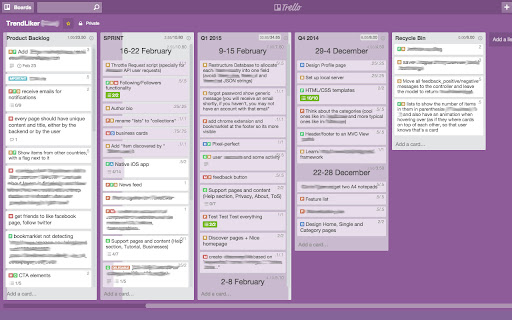
Super-charge your Trello boards with Story Points, Projects and Progress bars
Agile SCRUM for Trello boards gives super-powers to your Trello boards by enabling SCRUM features:
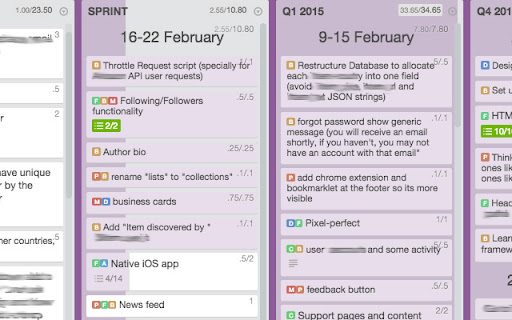
★ STORY POINTS: Set Story Points for Trello Cards
★ TIME SPENT: Set time spent on tasks.
★ TAGS: Group Cards into tags, User Stories or projects, these are colored automagically to save you time.
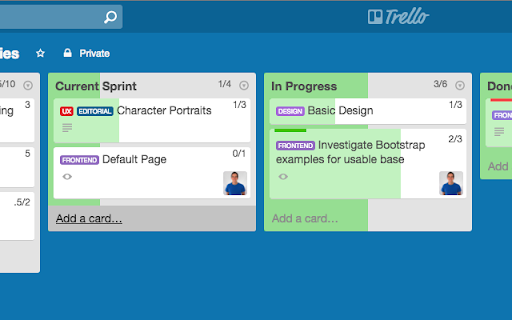
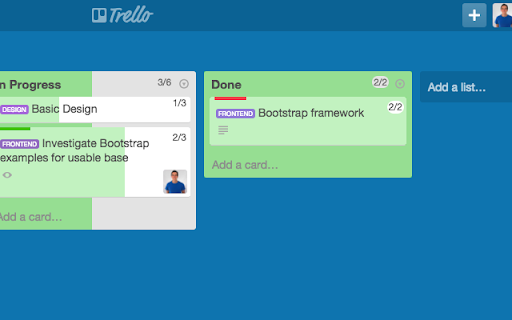
★ PROGRESS BARS: Visualize your Sprint evolution instantly with unobtrusive background progress bars on both cards and lists.
★ HEADER SEPARATORS: Use header separators to group cards inside lists.
★ VISUAL AIDS: Cards with more Story Points have a slightly increased font size so you can distinguish bigger from smaller tasks at a glance.
Instructions
―――――――――――――――――――
There's no need to set up anything! This extension is made to be simple, install it and start giving super powers to your boards.
Add SP to a card by typing the number in parenthesis:
"(3) Design new homepage header"
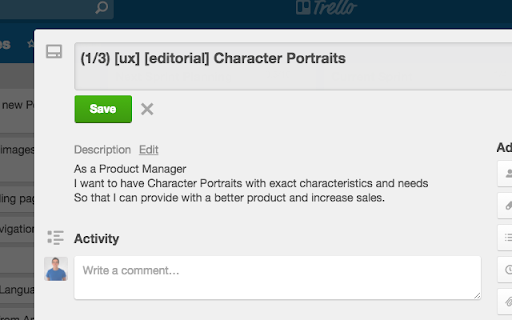
Track time spent on each card:
"(1/3) Design new homepage header"
Assign a card to a Project by writing it in square brackets:
"[dev] Implement Ads in footer"
Create a Header Separator by creating a new card with three asterisks at the start and end:
"*** Sprint 3 ***"
You can add as many tags as needed. Tags will be colored automatically in a random color.
Both SP and Tags can be defined anywhere in the card's text, it's usually best to add them at the start so it's easier to read.
At the top right of the Lists and Cards you can see how many story points have been completed and how many there are in total.
Compatibility
―――――――――――――――――――
If a team member doesn't have the extension installed he will still see be able to see Story Points and Projects as well as modify them (he won't see colors or progress bars). You can install/uninstall the extension at any time without loosing any data too.
This extension is the fastest and with the best performance of all similar extensions and at simply 2KB of code, a seamless extension to have installed, even for slow computers or for those users who want Chrome to work fast and are concerned on having too many extensions, this extension has such a tiny footprint that goes unnoticeable.
| 分类 | 📝工作流程与规划 |
| 插件标识 | njmflagahgdhopbcdilgahjlfiecakpe |
| 平台 | Chrome |
| 评分 |
☆☆☆☆☆
|
| 评分人数 | |
| 插件主页 | https://chromewebstore.google.com/detail/agile-scrum-for-trello-bo/njmflagahgdhopbcdilgahjlfiecakpe |
| 版本号 | 25.2.3.0 |
| 大小 | 44.17KiB |
| 官网下载次数 | 10000 |
| 下载地址 | |
| 更新时间 | 2022-04-10 00:00:00 |
CRX扩展文件安装方法
第1步: 打开Chrome浏览器的扩展程序
第2步:
在地址栏输入: chrome://extensions/
第3步: 开启右上角的【开发者模式】
第4步: 重启Chrome浏览器 (重要操作)
第5步: 重新打开扩展程序管理界面
第6步: 将下载的crx文件直接拖入页面完成安装
注意:请确保使用最新版本的Chrome浏览器