
Virtual School Lingo Bingo Chrome 插件, crx 扩展下载
Make virtual school a lot more fun!!!
Make virtual school a lot more fun with Virtual School (VS) Lingo Bingo!
How to play:
?Open the extension by clicking the VS Lingo Bingo icon in the top right corner (extension must be pinned)
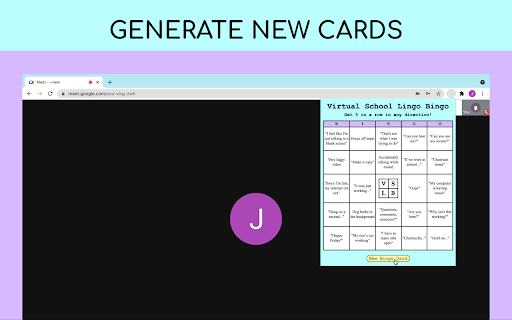
?When opening the extension for the first time, press "New Bingo Card" to fill the empty boxes.
?Click the free space in the centre at any time
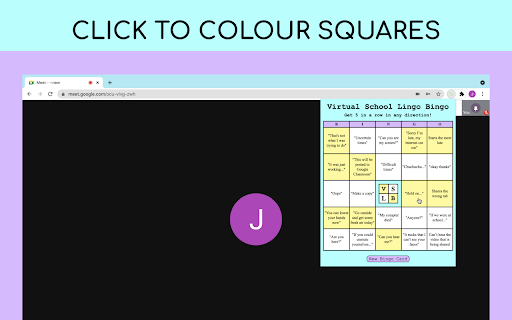
?When someone says or does something on your bingo card, click its square to keep track of it
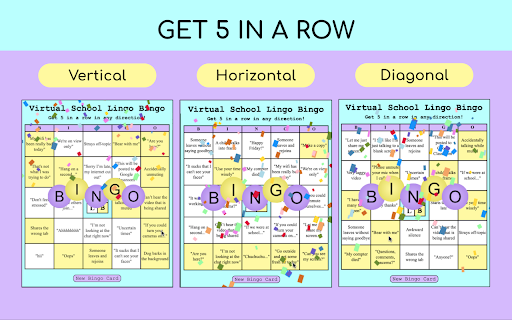
?When you get 5 in a row (horizontally, vertically, or diagonally), confetti will appear to celebrate your achievement
?The card will automatically reset after the confetti celebration
Some other tips:
?Quotation marks surround the things people may say, while regular prompts are things people may do
?The card will automatically save when you close the popup so that you can resume your game the next time you open it
?You can always deselect a square if need be
?If you do not like the prompts on your bingo card, you can get a new bingo card at any time by clicking the “New Bingo Card” button
?Pay attention in class and have fun! ?
Acknowledgements:
- Thank you to my awesome teacher for thinking of the online school bingo idea
- Thank you to everyone who helped come up with bingo prompts
| 分类 | 🎮游戏 |
| 插件标识 | njnahgjckemceggjlgiepglacgkgmafa |
| 平台 | Chrome |
| 评分 |
☆☆☆☆☆
|
| 评分人数 | |
| 插件主页 | https://chromewebstore.google.com/detail/virtual-school-lingo-bing/njnahgjckemceggjlgiepglacgkgmafa |
| 版本号 | 1.8.0.6 |
| 大小 | 55.53KiB |
| 官网下载次数 | 67 |
| 下载地址 | |
| 更新时间 | 2021-05-26 00:00:00 |
CRX扩展文件安装方法
第1步: 打开Chrome浏览器的扩展程序
第2步:
在地址栏输入: chrome://extensions/
第3步: 开启右上角的【开发者模式】
第4步: 重启Chrome浏览器 (重要操作)
第5步: 重新打开扩展程序管理界面
第6步: 将下载的crx文件直接拖入页面完成安装
注意:请确保使用最新版本的Chrome浏览器