
TabIt - NewTab: Productivity in Access Chrome 插件, crx 扩展下载
Inimitable NewTab pages by TabIt
New Tab page's content can shape all of your browser usage experience. Thus, 'TabIt - NewTab' will make your Google Chrome even more beneficial.
Surely, you have seen the default New Tab page with its 'recently visited web-sites'. You could've seen extensions providing a so-called Speed Dial, based on custom links with icons or thumbnails. And, if you wondered, why don't they ever use your bookmarks as those links — well, we did too!) And have developed a solution!
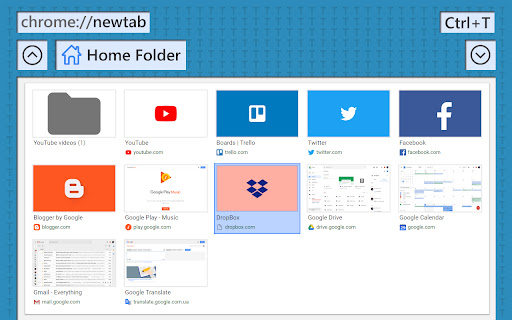
Bookmarks are easy to transfer from other browsers, and don't need third party involvement for storing. You can select some folder to be 'Home' for your New Tabs and put the most-often-used bookmarks in it.
There are four options for bookmarks' thumbnails: Default, None, Captured & Branded. Default and Captured thumbnails are usually screenshots of the corresponding web-sites. Benefits of the 'branded' thumbnails are best revealed, when used in a 'Home Folder'.
Keyboard shortcuts, sorting and other basic operations are available and intuitive. 'TabIt - NewTab' comes in two themes - Light & Dark.
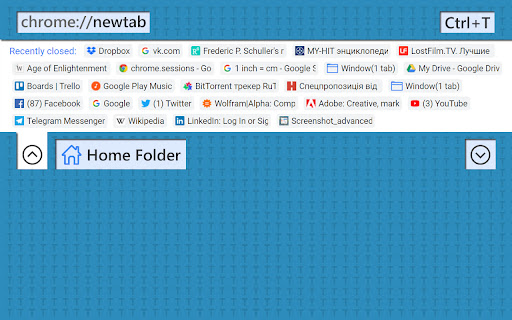
ONE MORE THING: It is very useful to have an access to the list of recently closed tabs & windows in order to open them back, when needed. 'TabIt - NewTab' has a corresponding panel for you, in a click away, in every New Tab.
- - - - - - - - - - - - - - - - - -
NOTE: Operation of this extension requires 'TabIt - BookMarks' to be installed and enabled. It will be responsible for thumbnails preparation and bookmarks creation/editing/sorting/restoring.
TabIt - BookMarks: https://chrome.google.com/webstore/detail/tabit-bookmarks/blcimedkggfdbmkpeggbhpdamohlhfcm
- - - - - - - - - - - - - - - - - -
***** WHAT TO EXPECT NEXT *****
+ Own server-side thumbnails preparation service
+ Drag&Drop to the TabIt - BookMarks
+ Better smoothness by animation
+ Background images
+ Other prettification :)
+ Your suggestions?
***** DECLARED PERMISSIONS ***** UPDATES *****
Please, see more detailed information about this extension here: https://alexperience.me/projects/tabit/tabit-newtab
| 分类 | 📝工作流程与规划 |
| 插件标识 | nlpjfjjgmmpjbcjbnjklbggcancdaehm |
| 平台 | Chrome |
| 评分 |
☆☆☆☆☆
|
| 评分人数 | |
| 插件主页 | https://chromewebstore.google.com/detail/tabit-newtab-productivity/nlpjfjjgmmpjbcjbnjklbggcancdaehm |
| 版本号 | 1.21.1 |
| 大小 | 173KiB |
| 官网下载次数 | 146 |
| 下载地址 | |
| 更新时间 | 2019-07-15 00:00:00 |
CRX扩展文件安装方法
第1步: 打开Chrome浏览器的扩展程序
第2步:
在地址栏输入: chrome://extensions/
第3步: 开启右上角的【开发者模式】
第4步: 重启Chrome浏览器 (重要操作)
第5步: 重新打开扩展程序管理界面
第6步: 将下载的crx文件直接拖入页面完成安装
注意:请确保使用最新版本的Chrome浏览器