
Social Revealer Chrome 插件, crx 扩展下载
Check your Facebook digital footprint
⚠️ DEVELOPER NOTE ⚠️
Facebook is gradually switching off its search endpoints Social Revealer depends on. Therefore some users might see "This page isn't available" on some searches. I'm working on a workaround/fix, please be patient.
With Social Revealer you'll gain access to hidden parts of Facebook profiles. There's much more than presented on timeline…
? Use cases
⭐️ Take control of your profile privacy.
⭐️ Show your share-everything friends what digital footprint they leave behind.
⭐️ Even when somebody has a blank timeline there's still a lot of data that might be seen.
? How does it work?
⭐️ Social Revealer builds up special queries to get access to hidden parts of Facebook.
⭐️ It works on your profile, your friends' profiles or anyone else's profiles.
⭐️ All content you'll see is implicitly shared with you - just not visible.
? Takeaway
⭐️ It's wise to think twice before sharing, liking or commenting anything.
? Features
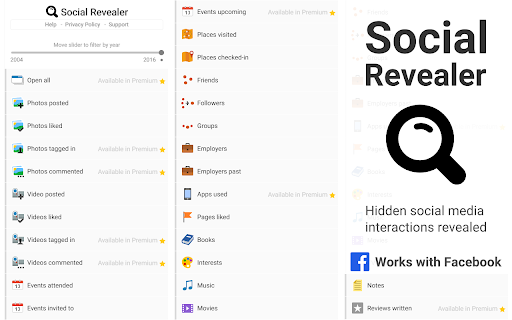
⭐️ Photos posted, liked
⭐️ Video posted, liked
⭐️ Videos liked
⭐️ Events attended, invited to, in past
⭐️ Places visited, checked-in
⭐️ Friends, followers. groups
⭐️ Employers current, past
⭐️ Pages liked
⭐️ Books, interests, music, movies, TV shows
⭐️ Notes
? Security and privacy
⭐️ No data are transmitted to anywhere, ever. Social Revealer is client-side only.
? Warranty/uncertainty of functionality
⭐️ Social Revealer depends on functionalities of 3rd parties therefore there's no guarantee all features will work the same forever. Some features may be removed, some new ones added. At worst it's also possible all features will stop working.
Made with ♥ by Peta Sittek
| 分类 | 👥社交 |
| 插件标识 | nmnnjcmpjlbbobehaikglfgpbjclcoeg |
| 平台 | Chrome |
| 评分 |
☆☆☆☆☆
|
| 评分人数 | |
| 插件主页 | https://chromewebstore.google.com/detail/social-revealer/nmnnjcmpjlbbobehaikglfgpbjclcoeg |
| 版本号 | 1.3.4 |
| 大小 | 96.3KiB |
| 官网下载次数 | 20000 |
| 下载地址 | |
| 更新时间 | 2019-07-23 00:00:00 |
CRX扩展文件安装方法
第1步: 打开Chrome浏览器的扩展程序
第2步:
在地址栏输入: chrome://extensions/
第3步: 开启右上角的【开发者模式】
第4步: 重启Chrome浏览器 (重要操作)
第5步: 重新打开扩展程序管理界面
第6步: 将下载的crx文件直接拖入页面完成安装
注意:请确保使用最新版本的Chrome浏览器