
ErrorAnnex Chrome 插件, crx 扩展下载
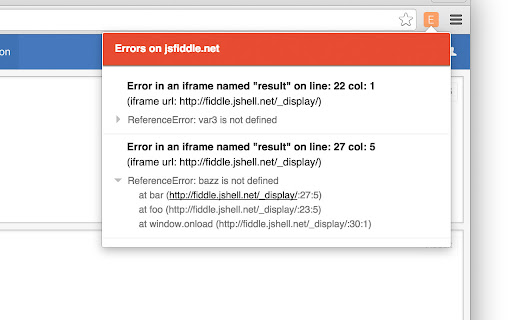
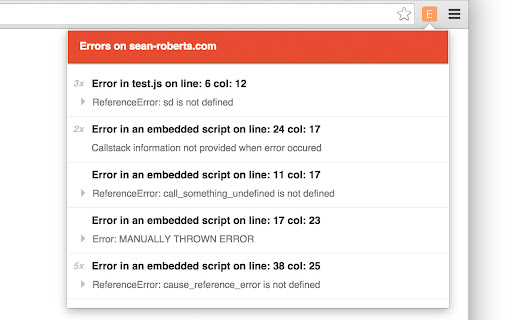
ErrorAnnex is the easiest way to listen for errors on your products and sites around the web.
ErrorAnnex is an extension that allows you to be notified when a JavaScript Error occurs on a web page. Simple.
-- ✔ Get notified of errors immediately
-- ✔ Capture the error source and message
-- ✔ Enable popup notifications for all or a specific domain
-- ✔ Receive the counts of duplicate errors
-- ✔ Know the current error state of a page at all times
-- ✔ Catch all errors residing in the top frame or in nested iframes
Whether you want to make sure your website, ad frames, newly shipped code, or curiosity are good to go, we can help you try to answer those questions.
-- Ready to get going? --
Install and you can immediately interact with the extension to see the error status of the given page you are on.
When your interactions or navigation on a page invokes an error, you'll be notified immediately with details that were given about the error.
Clicking the extension icon will open the page's error details.
-- Test it out --
This page has an error:
http://jsfiddle.net/hc5vodno/
| 分类 | 💻开发者工具 |
| 插件标识 | nmoaecckealdhaphagjdkpjeodgffmeg |
| 平台 | Chrome |
| 评分 |
☆☆☆☆☆
|
| 评分人数 | |
| 插件主页 | https://chromewebstore.google.com/detail/errorannex/nmoaecckealdhaphagjdkpjeodgffmeg |
| 版本号 | 8.3 |
| 大小 | 32.19KiB |
| 官网下载次数 | 95 |
| 下载地址 | |
| 更新时间 | 2015-08-07 00:00:00 |
CRX扩展文件安装方法
第1步: 打开Chrome浏览器的扩展程序
第2步:
在地址栏输入: chrome://extensions/
第3步: 开启右上角的【开发者模式】
第4步: 重启Chrome浏览器 (重要操作)
第5步: 重新打开扩展程序管理界面
第6步: 将下载的crx文件直接拖入页面完成安装
注意:请确保使用最新版本的Chrome浏览器