
Chrome Logger Chrome 插件, crx 扩展下载
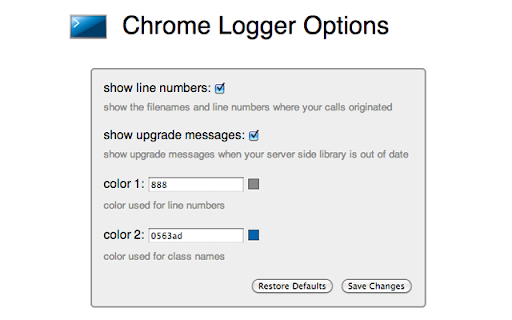
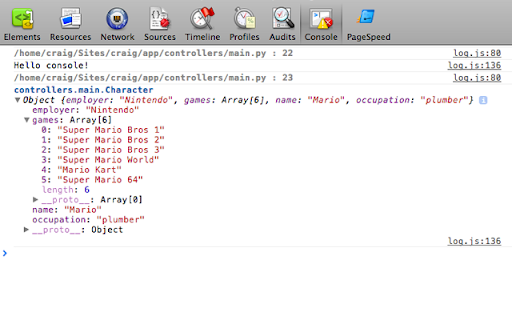
For server side logging and debugging in chrome console.
This extension is for debugging server side applications using the chrome javascript console. It was originally inspired by FirePHP.
For help getting started check out
http://www.chromelogger.com
Version 4.0 is basically a complete rewrite to rebrand this extension as Chrome Logger instead of ChromePHP and bring it up to date with the latest Chrome extension guidelines.
This extension was formerly known as ChromePHP.
Change Log
4.1.3 - Updates extension to use manifest v3 to ensure it works with future versions of Chrome. Also fixes issue where some colors may not work on the options page.
4.1.2 - Fixes race condition where logs sometimes get lost after a page refresh
4.1.1 - Tweak styles of options page
4.1.0 - Improves tab switching logic and updates sticky behavior to be based on host name
4.0.5 - Adds native color picker for choosing colors
4.0.4 - Uses atob function for base 64 decoding
4.0.3 - Fixes race condition in Chrome 28 on linux
4.0.2 - Adds support for console.table
Release notes
https://github.com/ccampbell/chromelogger/releases
| 分类 | 💻开发者工具 |
| 插件标识 | noaneddfkdjfnfdakjjmocngnfkfehhd |
| 平台 | Chrome |
| 评分 |
★★★★☆
4.2
|
| 评分人数 | 1216 |
| 插件主页 | https://chromewebstore.google.com/detail/chrome-logger/noaneddfkdjfnfdakjjmocngnfkfehhd |
| 版本号 | 4.1.3 |
| 大小 | 21.02KiB |
| 官网下载次数 | 30000 |
| 下载地址 | |
| 更新时间 | 2022-07-03 00:00:00 |
CRX扩展文件安装方法
第1步: 打开Chrome浏览器的扩展程序
第2步:
在地址栏输入: chrome://extensions/
第3步: 开启右上角的【开发者模式】
第4步: 重启Chrome浏览器 (重要操作)
第5步: 重新打开扩展程序管理界面
第6步: 将下载的crx文件直接拖入页面完成安装
注意:请确保使用最新版本的Chrome浏览器
同类插件推荐

Nightwatch Chrome Recorder
Nightwatch Extension for Devtools that allows you
Chrome Logger
For server side logging and debugging in chrome co
Tab Keeper - Chrome Tab Manager & Sync Tool
Efficiently save and synchronize tabs across devic

Extension Manager
A Chrome extension to manage other extensions.&quo