
ConnectWise Service Ticket Tab Updater Chrome 插件, crx 扩展下载
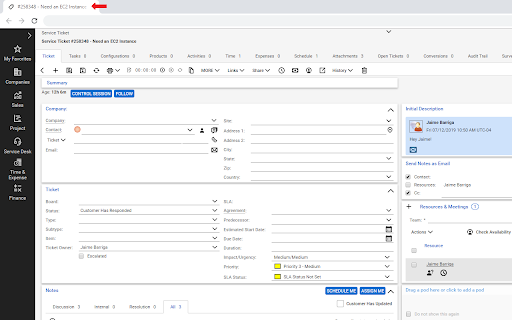
Sets the Service Ticket number and title as the name of the ticket tab!
Working in the Service Board is crazy difficult when you have a bunch of service tickets open as separate tabs, because all of them are just named "Service Ticket." Why don't they just display the ticket number/title as the name of the tab?! It truly boggles the mind.
This extension fixes that.
Once the page finishes loading (which may take forever because it's ConnectWise), just move your mouse anywhere on the page and it will set the name of the tab as the Ticket number and Ticket title.
Also if this extension is going to save you as much time as it is going to save me, I promise the time you get back will be well worth the money you spent on this extension.
Which is free right now (get in while you can!).
| 分类 | ♿无障碍访问 |
| 插件标识 | noapiahhhhccobnbmaajnmadmjjaeadg |
| 平台 | Chrome |
| 评分 |
☆☆☆☆☆
|
| 评分人数 | |
| 插件主页 | https://chromewebstore.google.com/detail/connectwise-service-ticke/noapiahhhhccobnbmaajnmadmjjaeadg |
| 版本号 | 2.19.1 |
| 大小 | 5.26KiB |
| 官网下载次数 | 579 |
| 下载地址 | |
| 更新时间 | 2019-07-20 00:00:00 |
CRX扩展文件安装方法
第1步: 打开Chrome浏览器的扩展程序
第2步:
在地址栏输入: chrome://extensions/
第3步: 开启右上角的【开发者模式】
第4步: 重启Chrome浏览器 (重要操作)
第5步: 重新打开扩展程序管理界面
第6步: 将下载的crx文件直接拖入页面完成安装
注意:请确保使用最新版本的Chrome浏览器