
Hide morning in Calendar Chrome 插件, crx 扩展下载
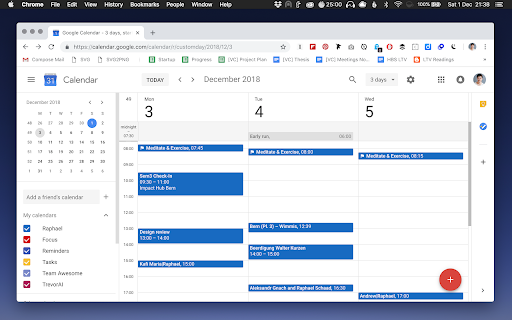
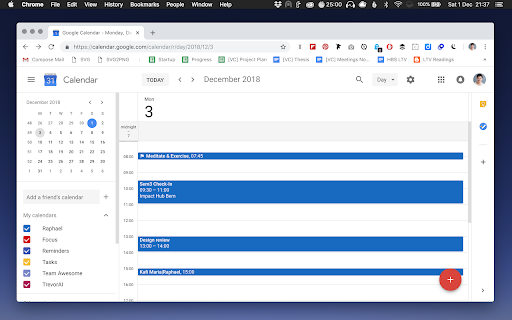

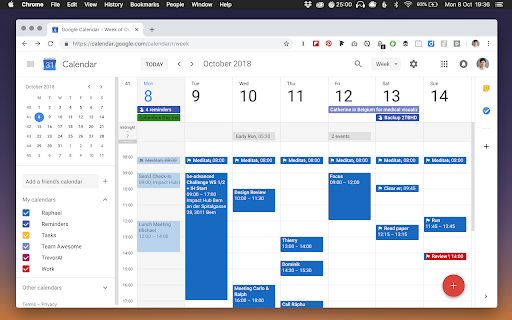
Hide morning hours on your Google Calendar to stop wasting space on your screen for empty hours.
When's the last time you had a meeting at 3am? Empty hours are irrelevant and waste space on your screen. This extension lets you minimize the range of hours in the morning on your Google Calendar, so you only see the title of events during those hours.
How does it work?
1. Click “Add to Chrome” to install the extension for free from the official Chrome Web Store.
2. Reload or open your Google Calendar in Chrome: https://www.google.com/calendar
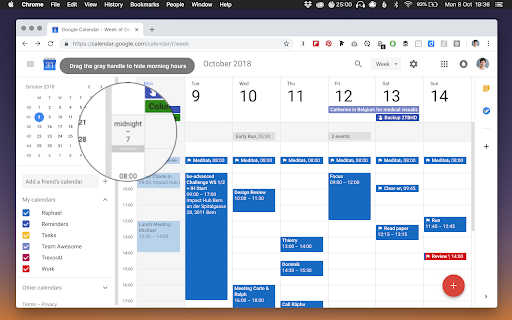
3. In the Day/Week/3 or 7 days view, you will notice a new small gray handle at the top of the times on the left. Drag it down to hide morning hours.
If you want to show those hours again, simply click the gray hidden hours at the top of the times on the left.
Who is it for?
When you use your calendar for work or school, you can set a range of working hours in the day that fits your schedule and remove the unnecessary white space during the times you're out of office or sleeping.
This extension currently works if the language of Google Calendar is set to English (US). Support for more languages coming soon.
Feel free to ask us any questions or tell us what you think. Contact at www.raphaelschaad.com.
Thanks for giving us a rating, if you like your clean new calendar look.
| 分类 | 📝工作流程与规划 |
| 插件标识 | oaikandahkibeihnampagmegnpfefhca |
| 平台 | Chrome |
| 评分 |
☆☆☆☆☆
|
| 评分人数 | |
| 插件主页 | https://chromewebstore.google.com/detail/hide-morning-in-calendar/oaikandahkibeihnampagmegnpfefhca |
| 版本号 | 0.1.9 |
| 大小 | 62.63KiB |
| 官网下载次数 | 20000 |
| 下载地址 | |
| 更新时间 | 2021-08-10 00:00:00 |
CRX扩展文件安装方法
第1步: 打开Chrome浏览器的扩展程序
第2步:
在地址栏输入: chrome://extensions/
第3步: 开启右上角的【开发者模式】
第4步: 重启Chrome浏览器 (重要操作)
第5步: 重新打开扩展程序管理界面
第6步: 将下载的crx文件直接拖入页面完成安装
注意:请确保使用最新版本的Chrome浏览器