
RecruitON Chrome 插件, crx 扩展下载



Lightweight and efficient tool to source, organize, export and share Linkedin candidate profiles!
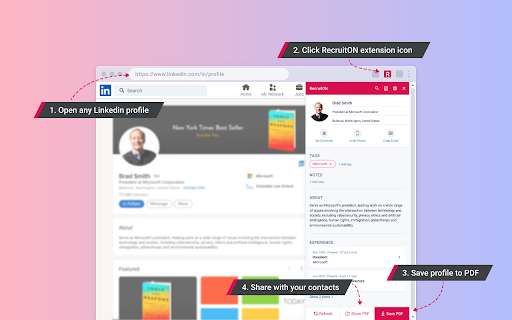
➤ Export Candidate Profiles as PDFs
RecruitON allows you to download Candidate profiles in the form of a PDF file.
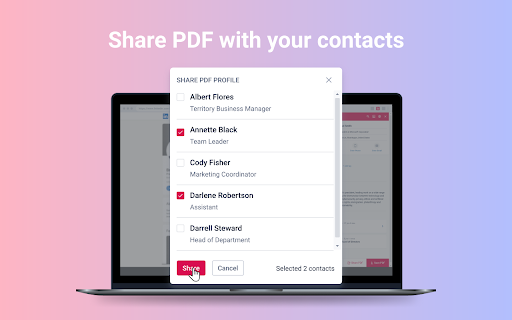
➤ Share Candidate Profiles
You can share promising or interesting candidate profiles with contacts in your address book. But do not forget to organize it first.
➤ Add Notes to Candidates
Use Notes to record and organize your thoughts on candidates throughout the hiring process.
➤ Set a Candidate Reminder
Timing is everything when hiring. Sometimes, though, you're not completely in-sync with a candidate you're interested in. Our function helps keep candidates top of mind down the road.
➤ Manage Tags and Source Tags
Use custom tags to organize your candidates. Good recruitment teams not only hire fast, but they go one step further and tag each candidate. Over time, you'll gather valuable information about every single candidate - and it will all be easily searchable later.
| 分类 | 📝工作流程与规划 |
| 插件标识 | obmkdnnpbekmdbcbmkchhpfiphoglnoe |
| 平台 | Chrome |
| 评分 |
☆☆☆☆☆
|
| 评分人数 | |
| 插件主页 | https://chromewebstore.google.com/detail/recruiton/obmkdnnpbekmdbcbmkchhpfiphoglnoe |
| 版本号 | 25.2.3.0 |
| 大小 | 1.82MiB |
| 官网下载次数 | 34 |
| 下载地址 | |
| 更新时间 | 2021-08-24 00:00:00 |
CRX扩展文件安装方法
第1步: 打开Chrome浏览器的扩展程序
第2步:
在地址栏输入: chrome://extensions/
第3步: 开启右上角的【开发者模式】
第4步: 重启Chrome浏览器 (重要操作)
第5步: 重新打开扩展程序管理界面
第6步: 将下载的crx文件直接拖入页面完成安装
注意:请确保使用最新版本的Chrome浏览器