
Browser EQ Chrome 插件, crx 扩展下载
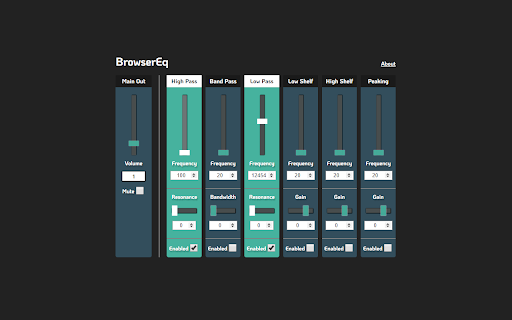

Control the frequency content of your browser audio
Browser EQ is a parametric audio equalizer that allows users to control the frequency content of their in-browser audio.
Is the volume level of a video you are watching too low? Is the video game footage you are watching too bass heavy or has a high pitched hiss going on in the background?
Now you can use Browser EQ to filter, boost or cut the audio frequency content of anything you are watching in the browser, whenever you want.
Release Notes:
As of version 1.0.0, there is only one instance of the eq enabled per browser, which means when you toggle the EQ popup on another tab, that tab will take over and the previously EQ'ed tab will go back to its default audio stream.
Right now EQ persists between URL changes and page refreshes, so to close it down completely you need to close the tab (or alternatively toggle the EQ on another page).
Coming soon,
Presets, specified by use cases to give you an easier starting values.
Panning controls, to fix possible stereo problems on the video you are watching.
Ability to turn EQ on/off from the UI without having to close the tab.
| 分类 | 🎉趣味休闲 |
| 插件标识 | odamhgdipmfelnoclggflemkjkigdnhe |
| 平台 | Chrome |
| 评分 |
☆☆☆☆☆
|
| 评分人数 | |
| 插件主页 | https://chromewebstore.google.com/detail/browser-eq/odamhgdipmfelnoclggflemkjkigdnhe |
| 版本号 | 102 |
| 大小 | 22.43KiB |
| 官网下载次数 | 2000 |
| 下载地址 | |
| 更新时间 | 2022-07-15 00:00:00 |
CRX扩展文件安装方法
第1步: 打开Chrome浏览器的扩展程序
第2步:
在地址栏输入: chrome://extensions/
第3步: 开启右上角的【开发者模式】
第4步: 重启Chrome浏览器 (重要操作)
第5步: 重新打开扩展程序管理界面
第6步: 将下载的crx文件直接拖入页面完成安装
注意:请确保使用最新版本的Chrome浏览器