
IntelliJ Surround My Text! Chrome 插件, crx 扩展下载
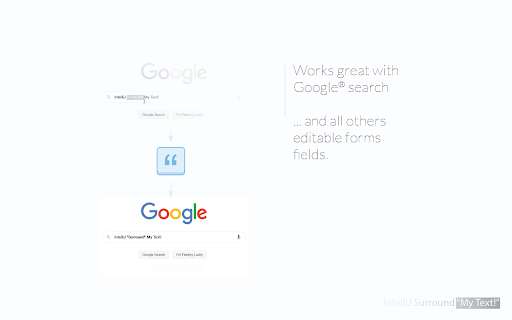
Wrap/surround selected text in forms with double quote (and whatever you want: single quote, comma, brace, curly, parenthesis, ...).
## How it work?
This extension allows you to wrap/surround a selected text in a editable content (like form fields) with a character of your choice. This is particularly useful when needing to quote a word with the "quotation marks" key of your keyboard, but also surrounded with parenthesis.
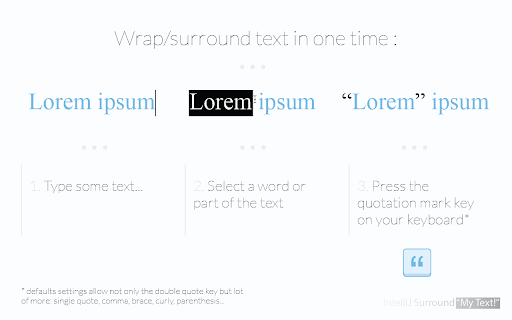
ℹ️ Example, I have made a text selection for the word "dolor", next I push the left parenthesis key:
BEFORE: Lorem ipsum dolor sit amet.
AFTER: Lorem ipsum (dolor) sit amet.
This extension allow more than the simple & double quotes, below the default configuration:
### Simple wrap (left character is the same of right):
" (double quotation mark) "
¨ (diaeresis (umlaut)) ¨
' (apostrophe) '
¸ (cedilla) ¸
` (back-tick or grave accent) `
´ (acute accent) ´
· (middle dot) ·
. (dot or full stop) .
* (asterisk) *
º (masculine ordinal indicator) º
ª (feminine ordinal Indicator) ª
° (degree symbol) °
% (percent sign) %
= (equal sign) =
+ (plus sign) +
! (exclamation mark) !
| (vertical bar) |
¦ (broken bar) ¦
~ (tilde) ~
¯ (macron) ¯
_ (low line) _
- (hyphen-minus) -
: (colon) :
¤ (currency sign) ¤
§ (section sign) §
### Simple wrap (left character is different of right):
< (less-than sign, greater-than sign) >
˂ (modifier letter left arrowhead, modifier letter right arrowhead) ˃
« (left-pointing double angle quotation mark, right-pointing double angle quotation mark) »
“ (left double quotation mark, right double quotation mark) ”
ʿ (modifier letter left half ring, modifier letter right half ring) ʾ
( (left parenthesis, right parenthesis) )
[ (left square bracket, right square bracket) ]
{ (left curly bracket, right curly bracket) }
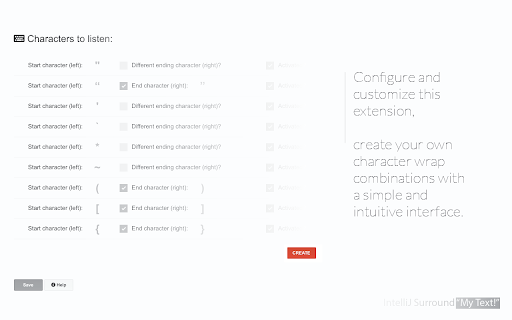
... and more! Customize it, and add lot of more characters as you want. All unicode + emoji are fully compatible.
✓ Light & fast
✓ No ads!
✓ Minimal extension permissions required
✓ Fully customizable
Works well:
✓ Leave selection intact after character wrapping (selection include all the the wrapped text + left/right chars.)
✓ Editor history preserved (undo/redo inside a form field)
100% compatible with:
✓ All unicode chars
✓ All emoji
✓ Gmail & other "fake" input fields
## How to use this extension:
1. In an editable form field, make a text selection; select a word, part of a word or all the text for example ...
2. Press the double quotation mark key: ", the selected text will be" surrounded by quotation marks).
### Create a new character configuration:
1. Indicate the character (the key on your keyboard) that will trigger the action when a text is selected
2. (optional) You can choose to "surround" the selected text with a character on the right different from that on the left
### Deactivate a character configuration:
You can, in order to keep your settings for a character, choose to temporarily deactivate a character. To do this, click on the check box on the right entitled "Activated?".
### Remove a character configuration:
You can permanently delete a character its parameters. To do this, click on the button on the right entitled "Delete".
| 分类 | 📝工作流程与规划 |
| 插件标识 | oeanaeldbmojllkcjmmfolgojajlljeh |
| 平台 | Chrome |
| 评分 |
☆☆☆☆☆
|
| 评分人数 | |
| 插件主页 | https://chromewebstore.google.com/detail/intellij-surround-my-text/oeanaeldbmojllkcjmmfolgojajlljeh |
| 版本号 | 25.2.3.0 |
| 大小 | 142KiB |
| 官网下载次数 | 133 |
| 下载地址 | |
| 更新时间 | 2020-02-24 00:00:00 |
CRX扩展文件安装方法
第1步: 打开Chrome浏览器的扩展程序
第2步:
在地址栏输入: chrome://extensions/
第3步: 开启右上角的【开发者模式】
第4步: 重启Chrome浏览器 (重要操作)
第5步: 重新打开扩展程序管理界面
第6步: 将下载的crx文件直接拖入页面完成安装
注意:请确保使用最新版本的Chrome浏览器