
Showdown Team Backup Chrome 插件, crx 扩展下载
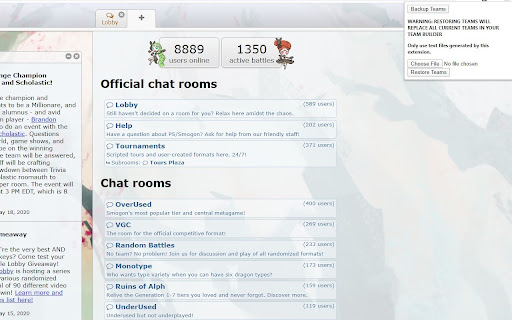
Backup and restore Pokemon Showdown! teams using text files.
Backup and restore Pokemon Showdown! teams using text files.
Pokémon and Pokémon character names are trademarks of Nintendo.
This project is not affiliated with Pokémon Showdown! or its creators.
**Note: Please manually backup your teams before using this extension for the first time. I am not responsible for any missing/damaged teams through the use of this project**
How does this work?
This extension backs up and downloads a text file of the showdown_teams value in localStorage that is used to store a user's teams. The restore function uses the same showdown_teams key and injects the value of an uploaded text file. As this extension works locally, any file uploaded is merely for the extension to process and inject data into the browser and is not uploaded to any server. Nevertheless, be wary of what text files you load into the extension and only use the ones that you have generated.
This project is open source! Check out the code on github here: https://github.com/mattadome/showdown-team-backup
| 分类 | 📝工作流程与规划 |
| 插件标识 | oebonbfbiilgdgmllmpapgpolejaghjf |
| 平台 | Chrome |
| 评分 |
☆☆☆☆☆
|
| 评分人数 | |
| 插件主页 | https://chromewebstore.google.com/detail/showdown-team-backup/oebonbfbiilgdgmllmpapgpolejaghjf |
| 版本号 | 25.2.3.0 |
| 大小 | 56.24KiB |
| 官网下载次数 | 113 |
| 下载地址 | |
| 更新时间 | 2020-05-23 00:00:00 |
CRX扩展文件安装方法
第1步: 打开Chrome浏览器的扩展程序
第2步:
在地址栏输入: chrome://extensions/
第3步: 开启右上角的【开发者模式】
第4步: 重启Chrome浏览器 (重要操作)
第5步: 重新打开扩展程序管理界面
第6步: 将下载的crx文件直接拖入页面完成安装
注意:请确保使用最新版本的Chrome浏览器