
Auto Screenshot Translator Extension Chrome 插件, crx 扩展下载
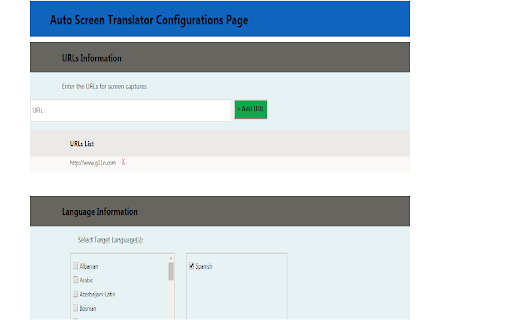
Translate, Navigate and takes Screenshots.
Navigate, Translate and Screenshots. Screen capture for a full page, translate, navigate to next page, organize all the screenshots and download with one-click.
Usage Instructions:
Right-click the AST icon on the browser to manage your translation options: Provide URLs, target languages and AST key in the options page and save the configuration.
To buy an API Key, please email [email protected].
HUMAN TRANSLATIONS
If the quality of machine translation does not fit your requirement and you would like to recreate your web pages from your translations database or order professional translations by native-speaking translators,
Please visit http://www.g11n.com/Home/RequestQuote
INTERNET CONNECTION:
Please note that AST requires the Internet connection to translate.
| 分类 | 📝工作流程与规划 |
| 插件标识 | oeolbkmoecehmgmgfghkldlbngokdjhb |
| 平台 | Chrome |
| 评分 |
☆☆☆☆☆
|
| 评分人数 | |
| 插件主页 | https://chromewebstore.google.com/detail/auto-screenshot-translato/oeolbkmoecehmgmgfghkldlbngokdjhb |
| 版本号 | 2.0.5 |
| 大小 | 247KiB |
| 官网下载次数 | 1000 |
| 下载地址 | |
| 更新时间 | 2021-04-06 00:00:00 |
CRX扩展文件安装方法
第1步: 打开Chrome浏览器的扩展程序
第2步:
在地址栏输入: chrome://extensions/
第3步: 开启右上角的【开发者模式】
第4步: 重启Chrome浏览器 (重要操作)
第5步: 重新打开扩展程序管理界面
第6步: 将下载的crx文件直接拖入页面完成安装
注意:请确保使用最新版本的Chrome浏览器