
Convin: Video record - Google Meet Chrome 插件, crx 扩展下载
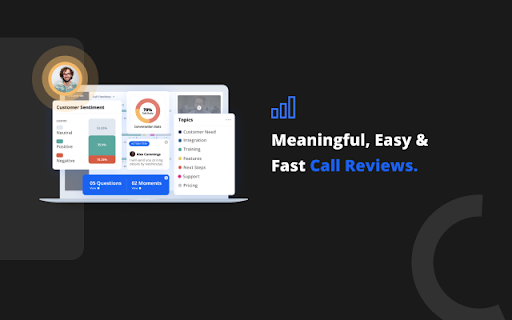

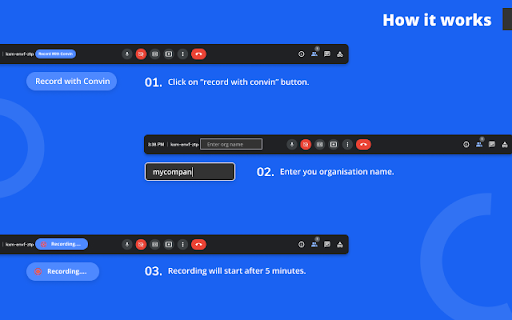

Record, Transcribe Google Meet meetings, highlight key moments, tag teammates
People keep on searching for truth through various channels ignoring something that has always been there in front of their eyes. The conversation with customers is the real intelligence that separates opinions from reality. It’s the voice of customers. Till now, most of the organisations don’t use it because they don’t realise the importance of the goldmine of data they are sitting on.
We believe that customer conversations can be the thread to weave together different functions in your organisation. Imagine a time when most of the decisions are taken after taking references from real conversations with customers.
Record, Transcribe Google Meet meetings
* Record & transcribe your Google Meets in video & text
* Instantly share fully contextualized meeting takeaways with your team
* Empower your team to catch up on meetings in minutes
Slack, Gmail, Hubspot, Salesforce, Pipedrive, and so many more
LOVED BY:
* Async-first teams
* Product and Engineering
* Customer Success & Sales
* User Research
* Recruiters & HR
* Webinars / Onboarding / Training
USED FOR:
*Internal Meetings
*Customer Calls and Demos
*Hiring and Recruiting
*Onboarding / Training
*User Testing, Market Research & Customer Interviews
for more info visit: https://convin.ai/
PRIVACY & SECURITY:
*Storage & Encryption*
We use industry-standard MariaDB, and Mongo DB hosted at Google, AWS and/or by the respective vendors. All connections to convin is encrypted using SSL. And any attempt to connect over HTTP is redirected to HTTPS
https://convin.ai/privacy-policy
| 分类 | 📝工作流程与规划 |
| 插件标识 | ofbnlahcaoadmanmkmpjjclpjnmbonpa |
| 平台 | Chrome |
| 评分 |
☆☆☆☆☆
|
| 评分人数 | |
| 插件主页 | https://chromewebstore.google.com/detail/convin-video-record-googl/ofbnlahcaoadmanmkmpjjclpjnmbonpa |
| 版本号 | 11.4.2 |
| 大小 | 19.96KiB |
| 官网下载次数 | 110 |
| 下载地址 | |
| 更新时间 | 2023-05-03 00:00:00 |
CRX扩展文件安装方法
第1步: 打开Chrome浏览器的扩展程序
第2步:
在地址栏输入: chrome://extensions/
第3步: 开启右上角的【开发者模式】
第4步: 重启Chrome浏览器 (重要操作)
第5步: 重新打开扩展程序管理界面
第6步: 将下载的crx文件直接拖入页面完成安装
注意:请确保使用最新版本的Chrome浏览器