
Swift Snap (Window Resizer) Chrome 插件, crx 扩展下载
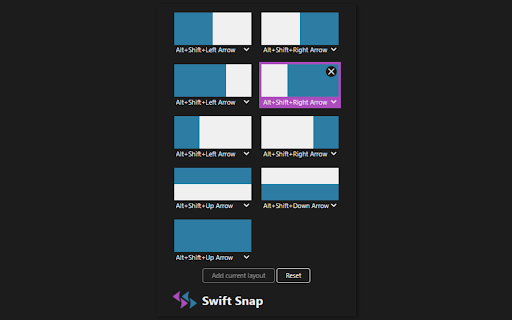
Snap and manage your windows with shortcuts!
Swift Snap is a configurable windows resizer that works with keyboard shortcuts, and best of all it supports multiple displays!
Features
- Convenient windows management with one click snapping and positioning
- Allows configuration of custom sizes and positions to simulate dual or triple monitors
- Multiple flexible shortcuts to cycle through a set of layouts
- Button and shortcut to move windows to another display
Great for
- Multitasking productivity with tiled windows to take advantage of screen estate
- Splitscreen for Google Meet, Zoom, and Webex video calls on the side
- Instantly setting window sizes for responsive web app development
Only applicable for browser tabs and windows. For users on Windows, a better alternative would be FancyZones from Microsoft PowerToys. For macOS, Rectangle and Spectacle are recommended.
Feel free to leave suggestions and feedback!
| 分类 | ⚙️功能性 |
| 插件标识 | ogncjloladfooiimjbdgdkokmlmjpkjd |
| 平台 | Chrome |
| 评分 |
☆☆☆☆☆
|
| 评分人数 | |
| 插件主页 | https://chromewebstore.google.com/detail/swift-snap-window-resizer/ogncjloladfooiimjbdgdkokmlmjpkjd |
| 版本号 | 0.1.6 |
| 大小 | 73.85KiB |
| 官网下载次数 | 1000 |
| 下载地址 | |
| 更新时间 | 2023-09-24 00:00:00 |
CRX扩展文件安装方法
第1步: 打开Chrome浏览器的扩展程序
第2步:
在地址栏输入: chrome://extensions/
第3步: 开启右上角的【开发者模式】
第4步: 重启Chrome浏览器 (重要操作)
第5步: 重新打开扩展程序管理界面
第6步: 将下载的crx文件直接拖入页面完成安装
注意:请确保使用最新版本的Chrome浏览器