
Smoothie: Type Faster on Any Website Chrome 插件, crx 扩展下载

Type faster with AI sentence predictions and custom text templates
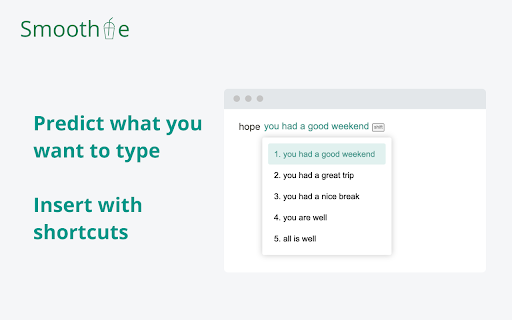
Smoothie is a writing assistant that helps you type faster on any website. It's like Gmail's Smart Compose feature, but works on any website. It is super simple to use, just type as you do normally, then use the paste shortcut (command + v for Mac and control + v for Windows) to insert auto-complete suggestions.
FEATURES
- Word prediction: help you type long words faster
- Sentence prediction: predict what you are about to type, auto-complete with keyboard shortcuts
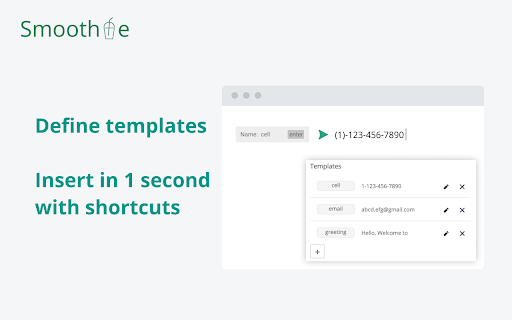
- Define repetitive pieces of text as templates, insert with keyboard shortcuts
KEYBOARD SHORTCUTS
- Insert prediction: command + v (for Mac) OR control + v (for Windows)
- Navigate across predictions: up / down OR - / +
- Select part of a prediction: left / right OR [ / ]
- Hide predictions, prevent above hotkeys: esc
- Enter text templates: double tab control key
- Turn Smoothie on/off: ctrl + space
FAQ: https://smoothie.unicornplatform.page/#faq-02-362421
| 分类 | 📝工作流程与规划 |
| 插件标识 | ogogkhoeobejfcakanfjfompbmebedfi |
| 平台 | Chrome |
| 评分 |
☆☆☆☆☆
|
| 评分人数 | |
| 插件主页 | https://chromewebstore.google.com/detail/smoothie-type-faster-on-a/ogogkhoeobejfcakanfjfompbmebedfi |
| 版本号 | 1.9.19 |
| 大小 | 662KiB |
| 官网下载次数 | 500 |
| 下载地址 | |
| 更新时间 | 2021-12-06 00:00:00 |
CRX扩展文件安装方法
第1步: 打开Chrome浏览器的扩展程序
第2步:
在地址栏输入: chrome://extensions/
第3步: 开启右上角的【开发者模式】
第4步: 重启Chrome浏览器 (重要操作)
第5步: 重新打开扩展程序管理界面
第6步: 将下载的crx文件直接拖入页面完成安装
注意:请确保使用最新版本的Chrome浏览器