
performance-HTML Chrome 插件, crx 扩展下载
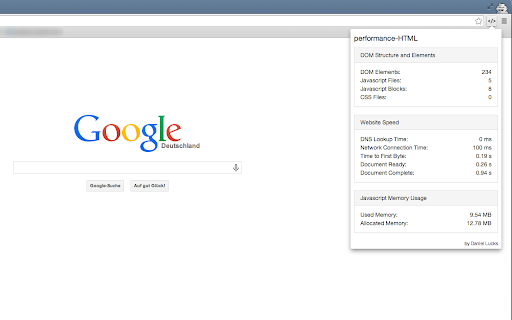
This extensions displays some technical and structural performance data of websites.
This extension determines and displays some very useful performance data of websites in a quick and easy way. Just open the website you want to inspect, click the icon in the browser bar and a popup shows up.
The popup will show performance data like: DNS Lookup Time, Network Connection Time, Time to First Byte, Document Ready and Document Complete. It also shows some performance information in terms of the DOM, such as number of external files (Javascript, CSS) or number of DOM elements. And finally there is a panel for memory usage of Javascript execution.
This extension will give you the possibility to get a quick overview of the performance of a website and to compare it with other sites.
Feedback is very welcome! If you have some feedback or ideas for additional information to show in the popup, don't hesitate to contact me.
| 分类 | 💻开发者工具 |
| 插件标识 | ogpakokhpomfmndbddggogokkmcjebpl |
| 平台 | Chrome |
| 评分 |
☆☆☆☆☆
|
| 评分人数 | |
| 插件主页 | https://chromewebstore.google.com/detail/performance-html/ogpakokhpomfmndbddggogokkmcjebpl |
| 版本号 | 8.3 |
| 大小 | 19.31KiB |
| 官网下载次数 | 1000 |
| 下载地址 | |
| 更新时间 | 2013-12-30 00:00:00 |
CRX扩展文件安装方法
第1步: 打开Chrome浏览器的扩展程序
第2步:
在地址栏输入: chrome://extensions/
第3步: 开启右上角的【开发者模式】
第4步: 重启Chrome浏览器 (重要操作)
第5步: 重新打开扩展程序管理界面
第6步: 将下载的crx文件直接拖入页面完成安装
注意:请确保使用最新版本的Chrome浏览器