
Datapare Price Tracker Chrome 插件, crx 扩展下载
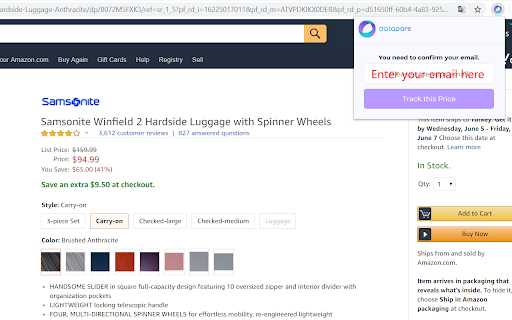
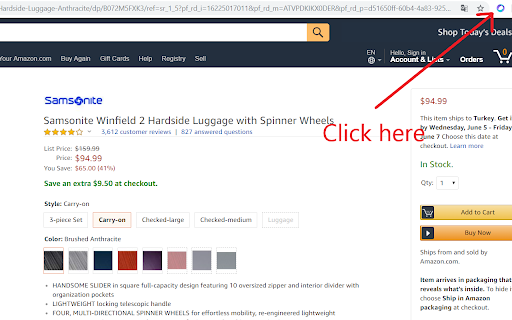
Track price drops from any e-commerce website.
Track price drops from any e-commerce website.
1) Install extension.
2) On the product page, click the extension button.
3) Enter your email address.
4) Price drops will be sent to you ASAP.
It is FREE for 10 products.
Language support /English
Terms of Service
Datapare website/extension provides free and paid service. We do not provide any warranty or guarantee of service or uptime. Any automated use of our service is strictly forbidden. People found to be using automation will be immediately and permanently banned. Datapare reserves the right to make changes and improvements to these Terms of Service at any time and without notice. By using this site you acknowledge that you have read and agree to these terms and do so at your own risk.
Privacy Policy
You can use all of our services without providing any personal information. However, if you do so we will not sell or trade your personal information under any circumstance. By setting up a tracking request on our site you'd like us to contact you via the contact information you provided to us. We will try to contact you only in necessery conditions. We will only keep your email to send information to you that demanded. If you decide to subscribe to one of our fee-based subscriptions we will share your email-address with the chosen payment provider - solely for the purpose of payment related communication. You can delete all your information by deleting your account through the settings.
Disclaimer
Datapare is not and will not responsible for any price change between the time that data collected and seen on the website.
| 分类 | 🛍️购物 |
| 插件标识 | ohbooindpgjalcmhcmcedlppakcmpddb |
| 平台 | Chrome |
| 评分 |
☆☆☆☆☆
|
| 评分人数 | |
| 插件主页 | https://chromewebstore.google.com/detail/datapare-price-tracker/ohbooindpgjalcmhcmcedlppakcmpddb |
| 版本号 | 13.1.2 |
| 大小 | 76.75KiB |
| 官网下载次数 | 23 |
| 下载地址 | |
| 更新时间 | 2019-07-22 00:00:00 |
CRX扩展文件安装方法
第1步: 打开Chrome浏览器的扩展程序
第2步:
在地址栏输入: chrome://extensions/
第3步: 开启右上角的【开发者模式】
第4步: 重启Chrome浏览器 (重要操作)
第5步: 重新打开扩展程序管理界面
第6步: 将下载的crx文件直接拖入页面完成安装
注意:请确保使用最新版本的Chrome浏览器