
WebStatData Organic Report Chrome 插件, crx 扩展下载
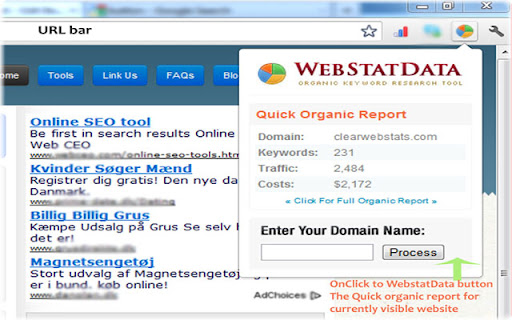
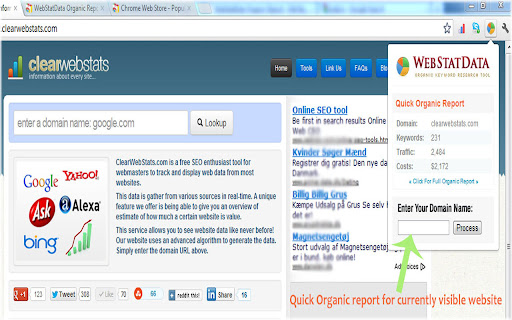
Displays quick Organic Report for currently visible website.
Displays quick Organic Report (from SEMRush) for currently visible website if we have data available. This includes, Total Keywords the site has in the TOP50 organic results, Estimated number of visitors coming from the first 50 search results (per month) and Estimated cost of purchasing the same number of visitors through Ads. While on click it will load a webstatdata.com report page for currently visible website. It will not display any Data if we do not have enough data or if the visible website is New.
Features :
●Google.com
▓- Organic Keywords report -▓ (Base on Google Search)
-Live Google PageRank
-google Indexed Pages
-google Backlinks
●▓-Yahoo.com▓
-yahoo Indexed Pages
-yahoo Back Links
●▓- Bing.com ▓
-Bing.com Index pages
-bing.com Backlinks
-bing.com Indexed Pages
Graph data from...
- Majestic SEO -Alexa rank
● Social Engagements (count)
-Facebook Shares count:
-Tweets or retweet count:
-Digg Stories share count:
● Website General Information
- Domain Extension:
- Domain Hosted IP Address
- Domain Hosted Country:
- Domain WHOIS Lookup
- Similar sites to certain domain
| 分类 | 🛠️工具 |
| 插件标识 | ojkifegjmjnpgpnkfiblcinhicphmapi |
| 平台 | Chrome |
| 评分 |
☆☆☆☆☆
|
| 评分人数 | |
| 插件主页 | https://chromewebstore.google.com/detail/webstatdata-organic-repor/ojkifegjmjnpgpnkfiblcinhicphmapi |
| 版本号 | 1.0.0.47 |
| 大小 | 13.49KiB |
| 官网下载次数 | 158 |
| 下载地址 | |
| 更新时间 | 2023-12-18 00:00:00 |
CRX扩展文件安装方法
第1步: 打开Chrome浏览器的扩展程序
第2步:
在地址栏输入: chrome://extensions/
第3步: 开启右上角的【开发者模式】
第4步: 重启Chrome浏览器 (重要操作)
第5步: 重新打开扩展程序管理界面
第6步: 将下载的crx文件直接拖入页面完成安装
注意:请确保使用最新版本的Chrome浏览器