
WeDeex Chrome 插件, crx 扩展下载
Analyse Internet Usage Carbon Footprint
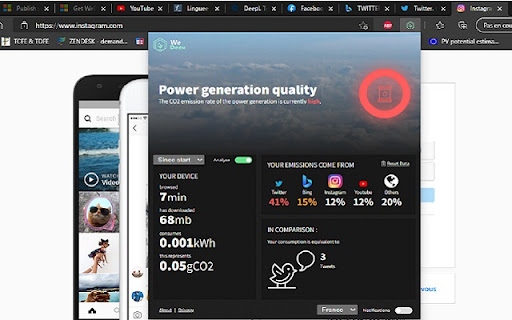
WeDeex plug-in enables you to follow the CO2 impact of your web browsing. Which one of your favorite websites is the most consuming one ? You will now be able to name it ! Just start the WeDeex analysis on your Edge browser :)
Features :
▪ Get a real-time simple indicator about the CO2 emission level linked to electrical power generation in France (more countries to come)
▪ Start & stop an analysis to see the power consumption and the CO2 emissions associated to the data exchanged through your Edge usage
▪ Display the 5 top consuming websites
▪ Realize what CO2 emissions mean with practical examples
Using WeDeex plug-in, you will become a master in understanding how a conscious web browsing can impact your carbon footprint !
/!\ Your browsing history won't be stored or sold, the analysis is done locally and it only concerns the AMOUNT of exchanged data, not the data itself ! Moreover, you can reset the displayed data at any time ?
| 分类 | 📝工作流程与规划 |
| 插件标识 | ojlagggckhpedblhemgjhecbggnibale |
| 平台 | Chrome |
| 评分 |
☆☆☆☆☆
|
| 评分人数 | |
| 插件主页 | https://chromewebstore.google.com/detail/wedeex/ojlagggckhpedblhemgjhecbggnibale |
| 版本号 | 25.2.3.0 |
| 大小 | 6.15MiB |
| 官网下载次数 | 116 |
| 下载地址 | |
| 更新时间 | 2021-06-23 00:00:00 |
CRX扩展文件安装方法
第1步: 打开Chrome浏览器的扩展程序
第2步:
在地址栏输入: chrome://extensions/
第3步: 开启右上角的【开发者模式】
第4步: 重启Chrome浏览器 (重要操作)
第5步: 重新打开扩展程序管理界面
第6步: 将下载的crx文件直接拖入页面完成安装
注意:请确保使用最新版本的Chrome浏览器