
HostAdmin Chrome 插件, crx 扩展下载
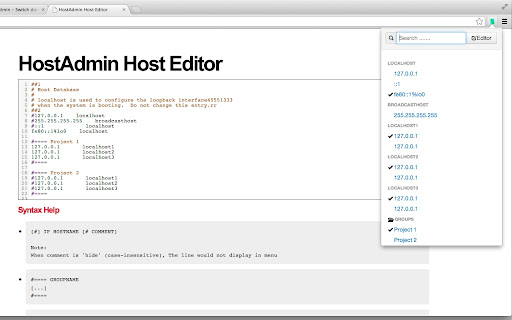
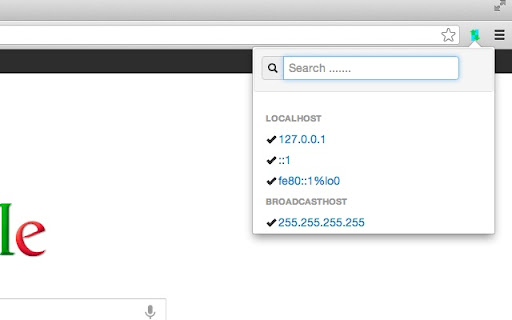
Saving your time when you switch domain-ip mapping (Hosts file) between different environment. Awesome host file editor !
HostAdmin Chrome port
Saving your time when you switch domain-ip mapping between different environment
Firefox Version
https://addons.mozilla.org/en-US/firefox/addon/hostadmin/
Introduction
HostAdmin is a Firefox Addon , that helps you modify the Hosts file , switch domain-ip mapping. HostAdmin can understand your Hosts file via a enhanced Hosts file syntax.
In additional, HostAdmin refresh your DNS cache automaticlly whenever you change your Hosts file, even manually.
How does HostAdmin analyze the Hosts file
Common
IP DOMAIN [#COMMENT]
127.0.0.1 localhost #comment here
when comment is 'hide' (case-insensitive), that line would not display in menu.
Grouping
#==== Project 1
#127.0.0.1 localhost1
127.0.0.1 localhost2
127.0.0.1 localhost3
#====
#==== Project 2
#127.0.0.1 localhost1
#127.0.0.1 localhost2
#127.0.0.1 localhost3
#====
Syntax detail
http://code.google.com/p/fire-hostadmin/wiki/HOST_SYNTAX
Switching Hosts using HostAdmin
By using HostAdmin to switch Hosts, the Hosts need to be written access.
XP users need NO additional setting
Here is a guide for you to gain write privilege for Vista/7/Linux users
http://code.google.com/p/fire-hostadmin/wiki/GAIN_HOSTS_WRITE_PERM
Switch Hosts Manually
The Hosts might be switched manually
If they do so
HostAdmin will refresh DNS immediately
Feedback
http://code.google.com/p/fire-hostadmin/issues/list
| 分类 | 💻开发者工具 |
| 插件标识 | oklkidkfohahankieehkeenbillligdn |
| 平台 | Chrome |
| 评分 |
☆☆☆☆☆
|
| 评分人数 | |
| 插件主页 | https://chromewebstore.google.com/detail/hostadmin/oklkidkfohahankieehkeenbillligdn |
| 版本号 | 8.3 |
| 大小 | 181KiB |
| 官网下载次数 | 1000 |
| 下载地址 | |
| 更新时间 | 2013-08-17 00:00:00 |
CRX扩展文件安装方法
第1步: 打开Chrome浏览器的扩展程序
第2步:
在地址栏输入: chrome://extensions/
第3步: 开启右上角的【开发者模式】
第4步: 重启Chrome浏览器 (重要操作)
第5步: 重新打开扩展程序管理界面
第6步: 将下载的crx文件直接拖入页面完成安装
注意:请确保使用最新版本的Chrome浏览器