
Thirst Chrome 插件, crx 扩展下载
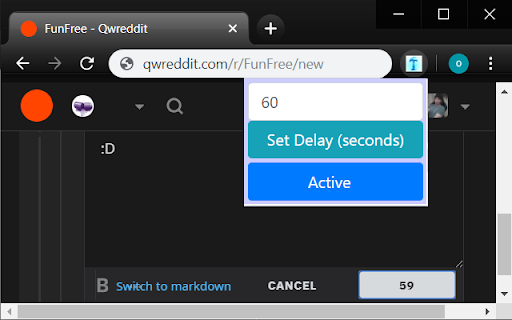
Quench your Thirst... or at least hide it. Thirst forces you to wait before sending that fateful message.
Do you have trouble resisting the urge to hit submit on that lengthy post before you've proofread it? Do you have a bad habit of blowing up that special someone's social media page? Thirst is the extension you need!
Thirst gives you the self-control you always wish you had. You simply set the amount of seconds you wish to wait before sending a message, and Thirst takes care of the rest. Don't come off as thirsty, use Thirst!
Directions:
Click the blue T icon after installing the extension to set the amount of seconds to wait before sending a message and then click Set Delay to confirm. You can also enable and disable the extension from this menu. Clicking on any web page submit button will force a countdown before the message is sent. If you want to cancel the countdown because you need more time to make some corrections, click on the submit button again. Otherwise just let the timer hit zero to send the message. Changing tabs will not pause the countdown, so if you really want to make someone sweat, write a clever response, put a bunch of time on the clock, click send, and then go on about your browsing in a new tab.
Compatibility:
Right now it only works on Reddit. Some of Facebook is functional but this is VERY beta, for bug reporting only for those who would like to help me out. It does not function for Messenger yet. I will be adding more functionality as well as compatibility to many more sites within the next year.
Sites I will be adding in the future, in no particular order:
- The most commonly used email clients, blogging platforms, and IRC web clients
- Twitter
- Youtube
- The whole Stack Exchange Network of sites
- Tinychat, Jumpin.chat
- Any forum powered by vBulletin or Discourse
- Tinder, Bumble, OKCupid, Plenty of Fish
- The browser versions of Skype, Discord, Instagram, and VSCO
Feel free to suggest other sites you would like to see added to this list, or to mention which of these you are most excited about. I will be deciding what order to add these in based on your feedback. My vision for the future is to also make this extension an app for Android, iOS, and Windows phones, but for now I am focusing only on websites accessed via a laptop or computer with Google Chrome installed.
A note from extension creator omikes -
I am a uniquely helpful software developer. I am good at programming AND talking to people; a creature too strange to live but too rare to die. I will actually respond to your requests and add features you would like to this free extension if they are reasonable. No, I will not be adding a VSCO filter to put a puppy mask on your face. IT HAS TO BE SOMETHING TO DO WITH THE SCOURGE OF INTERNET THIRST; we must come together as one to eliminate it. In fact, from now on that is our mission statement. For technical assistance, any websites you want this extension to work on, and/or any features you want added, just shoot me an email at [email protected] and I will respond ASAP (Sorry if you tried to email the last email I had listed and it wasn't responded to. I am in the process of migrating my website so I have listed my personal email instead until I can get that sorted out.)
| 分类 | 👥社交 |
| 插件标识 | olkcoondpjagoelbfkanpmcllohimpon |
| 平台 | Chrome |
| 评分 |
☆☆☆☆☆
|
| 评分人数 | |
| 插件主页 | https://chromewebstore.google.com/detail/thirst/olkcoondpjagoelbfkanpmcllohimpon |
| 版本号 | 3.128.4 |
| 大小 | 392KiB |
| 官网下载次数 | 6 |
| 下载地址 | |
| 更新时间 | 2019-11-22 00:00:00 |
CRX扩展文件安装方法
第1步: 打开Chrome浏览器的扩展程序
第2步:
在地址栏输入: chrome://extensions/
第3步: 开启右上角的【开发者模式】
第4步: 重启Chrome浏览器 (重要操作)
第5步: 重新打开扩展程序管理界面
第6步: 将下载的crx文件直接拖入页面完成安装
注意:请确保使用最新版本的Chrome浏览器