
TabNotes Chrome 插件, crx 扩展下载

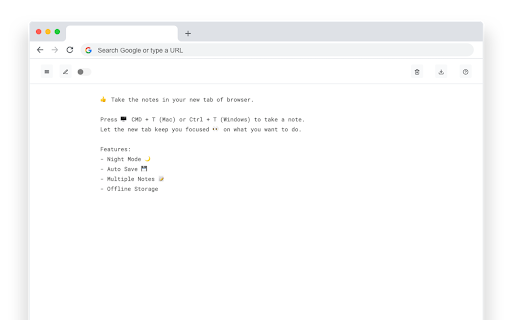


Take notes in new tab
Take the notes in your new Tab.
Press CMD + T (Mac) or Ctrl + T (Windows) to take a note.
Let the new tab keep you focused on what you want to do.
Increase your productivity.
What is Tab Notes?
- TabNotes is a Browser Based Notepad
- TabNotes is a Simple Text Editor
- TabNotes is an Online text editor
- TabNotes is an Online notes taking app
Features:
- Markdown Preview
Take notes in markdown, and preview as HTML. Press esc key to toggle HTML Preview.
- Dark mode
Developer loves the dark mode. So we have the one. Default theme is white.
- Auto Save
You don't need to save your text note. When you open new tab start from where you were left.
- Multiple notes.
Chrome allows you to store up to 5MB. It's enough to save 5,000 notes of small size.
- Offline Storage
Notes are stored directly in your browser. So only you can access your notes.
V-1.1.0
- Added HTML Preview of markdown syntax
- Changed Color Scheme of dark theme.
- Fixed some minor issues.
| 分类 | 📝工作流程与规划 |
| 插件标识 | omgomlnnfccahaaicaphjjgkjplfkjai |
| 平台 | Chrome |
| 评分 |
☆☆☆☆☆
|
| 评分人数 | |
| 插件主页 | https://chromewebstore.google.com/detail/tabnotes/omgomlnnfccahaaicaphjjgkjplfkjai |
| 版本号 | 54.0a1 |
| 大小 | 304KiB |
| 官网下载次数 | 1000 |
| 下载地址 | |
| 更新时间 | 2020-04-11 00:00:00 |
CRX扩展文件安装方法
第1步: 打开Chrome浏览器的扩展程序
第2步:
在地址栏输入: chrome://extensions/
第3步: 开启右上角的【开发者模式】
第4步: 重启Chrome浏览器 (重要操作)
第5步: 重新打开扩展程序管理界面
第6步: 将下载的crx文件直接拖入页面完成安装
注意:请确保使用最新版本的Chrome浏览器