
Adaptive Bitrate Manifest Viewer Chrome 插件, crx 扩展下载
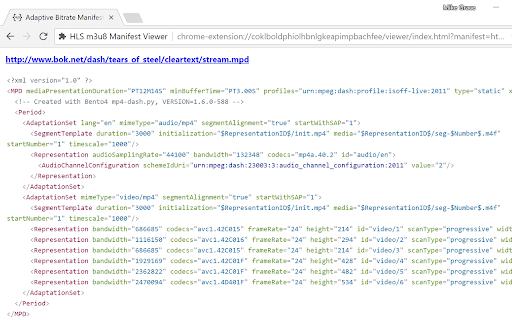
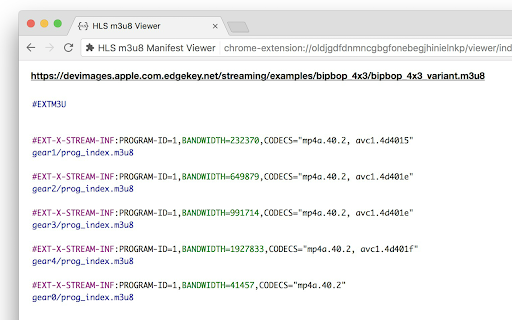
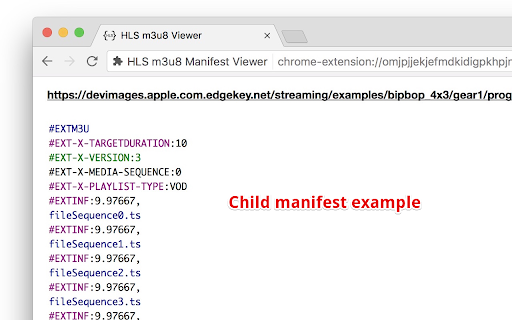
View HLS m3u8, MPEG Dash, and SMIL manifests in Chrome with syntax highlighting.
Avoid having to download the manifest file and then open in a text editor just to view it.
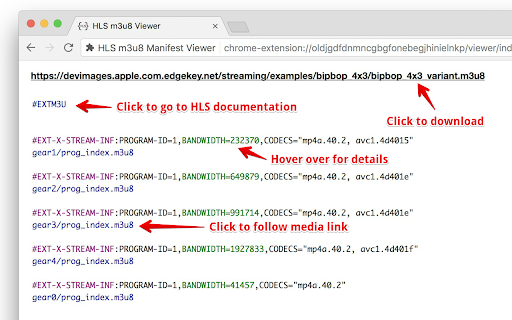
The extension works by blocking the download when the manifest is requested as the main url and then parses and displays it. Some syntax highlighting and definition links to the ietf.org draft documentation. To download the manifest file, click on the source url at the top of the page. Resources are linked in the manifest to make it easy to test the different parts.
You can test it out using a sample manifest url like https://bitdash-a.akamaihd.net/content/MI201109210084_1/m3u8s/f08e80da-bf1d-4e3d-8899-f0f6155f6efa.m3u8
CHANGELOG
===========
2018-03-26 0.9.1 Fixed an issue where URIs with equal signs in them wouldn't get replaced.
2018-01-29 0.9.0 Added ability to handle MPEG Dash and SMIL formats as well. Better handling of 404 and SSL certificate issues on manifest request. Major contributions made by my friend Joe Greathead.
2017-12-18 0.8.5 Excluding a few more domains reportedly having issues with this extension.
2017-06-19 0.8.4 Fixed bug where URIs in tags were incorrectly hyperlinked.
2017-05-11 0.8.3 Excluding http://video-dev.github.io/hls.js/demo/ to avoid causing issues.
2017-05-04 0.8.2 added a few more tags to the pattern and definitions list.
| 分类 | 💻开发者工具 |
| 插件标识 | omjpjjekjefmdkidigpkhpjnojoadbih |
| 平台 | Chrome |
| 评分 |
☆☆☆☆☆
|
| 评分人数 | |
| 插件主页 | https://chromewebstore.google.com/detail/adaptive-bitrate-manifest/omjpjjekjefmdkidigpkhpjnojoadbih |
| 版本号 | 8.3 |
| 大小 | 52.88KiB |
| 官网下载次数 | 3000 |
| 下载地址 | |
| 更新时间 | 2022-07-14 00:00:00 |
CRX扩展文件安装方法
第1步: 打开Chrome浏览器的扩展程序
第2步:
在地址栏输入: chrome://extensions/
第3步: 开启右上角的【开发者模式】
第4步: 重启Chrome浏览器 (重要操作)
第5步: 重新打开扩展程序管理界面
第6步: 将下载的crx文件直接拖入页面完成安装
注意:请确保使用最新版本的Chrome浏览器