
Tab Bundler Chrome 插件, crx 扩展下载

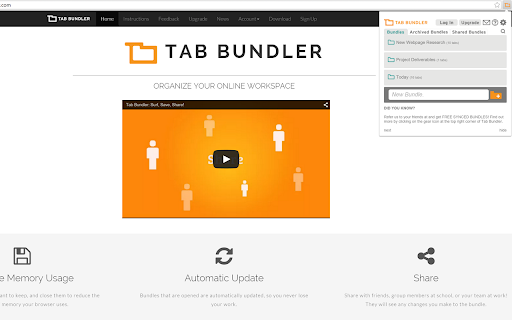
Share and Organize Like Never Before
Due to lack of developer attention, Tab Bundler will be deprecated by March of 2023. We suggest that you back up your bundles as there is no guarantee that you will be able to re-install the application by then.
Backend data will be backed up one last time by March, and servers will be shut down. This means that any data stored in our backends will require manual request via email. The team will support this until June 2023, until which email will no longer be monitored.
---
- Sync webpages across multiple computers.
- Separate various topics of online research into single-click-to-open bundles.
- Share and collaborate on links between co-workers and friends by sending it right to their browser!
- Access bundles you've created at home, when you're on your at work, and vice versa.
- Never lose information - you can choose for bundles to be stored on the cloud.
- Speed up your browser - Reduce RAM usage by saving currently unused tabs into bundles that can be opened with a single click.
Find out more by visiting www.tabbundler.com
Here are explanations for the permissions that are required:
Read and change your data on www.tabbundler.com - This is used to implement synchronization
Read your browsing history - Tab Bundler does not monitor or even read browsing history. This is what Chrome calls the permission required for accessing tab information which is required for saving bundles
Communicate with cooperating websites - 'Cooperating websites' refers only to www.tabbundler.com
| 分类 | 📝工作流程与规划 |
| 插件标识 | ooajenhhhbdbcolenhmmkgmkcocfdahd |
| 平台 | Chrome |
| 评分 |
☆☆☆☆☆
|
| 评分人数 | |
| 插件主页 | https://chromewebstore.google.com/detail/tab-bundler/ooajenhhhbdbcolenhmmkgmkcocfdahd |
| 版本号 | 25.2.3.0 |
| 大小 | 656KiB |
| 官网下载次数 | 5000 |
| 下载地址 | |
| 更新时间 | 2022-12-26 00:00:00 |
CRX扩展文件安装方法
第1步: 打开Chrome浏览器的扩展程序
第2步:
在地址栏输入: chrome://extensions/
第3步: 开启右上角的【开发者模式】
第4步: 重启Chrome浏览器 (重要操作)
第5步: 重新打开扩展程序管理界面
第6步: 将下载的crx文件直接拖入页面完成安装
注意:请确保使用最新版本的Chrome浏览器