
Scriber Chrome 插件, crx 扩展下载

Automate your browser actions and replay them on https://runape.com
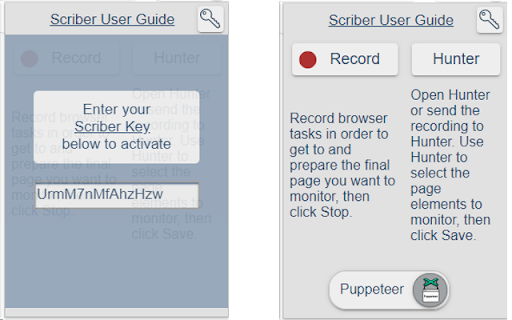
Scriber records your browser actions and navigation into a re-playable monitor script (CasperJS or Puppeteer) that you can use in your monitors on https://runape.com.
After recording the actions, click the Hunter button to load Hunter that will help you save the page selections that you want to monitor for changes.
Help: https://runape.com/Support/Help?page=scriber_browser_extension
Video: https://youtu.be/kq4aT1mRUdU
monitor website changes
page monitor
track website changes
alert when website changes
website change notification
website change detection
Change Detection and Notification
email when website changes
get notification when a website is updated
notification for website update
monitor web page for keyword
online website watcher
website alert
website defacement monitoring
product price monitoring
price tracker
website watcher
best page monitor
free website monitoring
track web site content
track web page updates
email notifications
web scraping bot
extract articles from website
| 分类 | 📝工作流程与规划 |
| 插件标识 | oodclnpmimnnobgedlkiokaplmmmdkgm |
| 平台 | Chrome |
| 评分 |
☆☆☆☆☆
|
| 评分人数 | |
| 插件主页 | https://chromewebstore.google.com/detail/scriber/oodclnpmimnnobgedlkiokaplmmmdkgm |
| 版本号 | 25.2.3.0 |
| 大小 | 620KiB |
| 官网下载次数 | 42 |
| 下载地址 | |
| 更新时间 | 2021-10-06 00:00:00 |
CRX扩展文件安装方法
第1步: 打开Chrome浏览器的扩展程序
第2步:
在地址栏输入: chrome://extensions/
第3步: 开启右上角的【开发者模式】
第4步: 重启Chrome浏览器 (重要操作)
第5步: 重新打开扩展程序管理界面
第6步: 将下载的crx文件直接拖入页面完成安装
注意:请确保使用最新版本的Chrome浏览器