
Merch Mastermind Toolkit Chrome 插件, crx 扩展下载
Toolkit for Merch by Amazon Mastermind Group
Toolkit of custom extension features for Merch by Amazon Mastermind Group
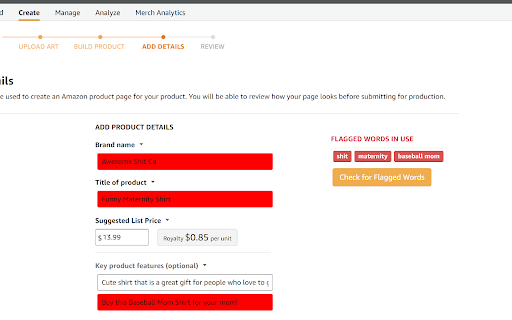
v1.7.4 NEW Feature: Character Count on Listing page inputs.
v1.7.3 Update: Add more suggested flagged words (related to Amazon's policy of not describing the shirt blank, shipping, or printing process)
v1.7 Feature List:
* NEW: Flagged Words feature: Protect against triggering Manual Reviews; Give yourself or your VA a warning when any word from a customizable list is used in your Merch listing text when adding designs.
* Extension Popup with Bug report button / Open Settings button
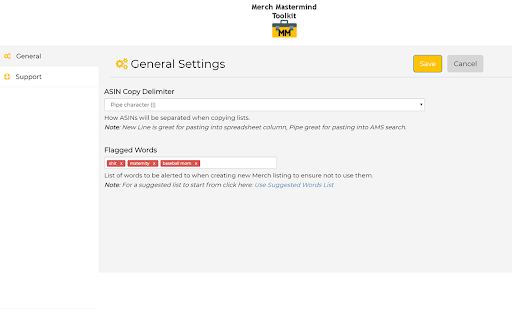
* Settings Page
- Configure delimiter when copying ASINs (New line, Pipe character, or Comma)
- Configure custom set of words to Flag when inputting Merch Listing data.
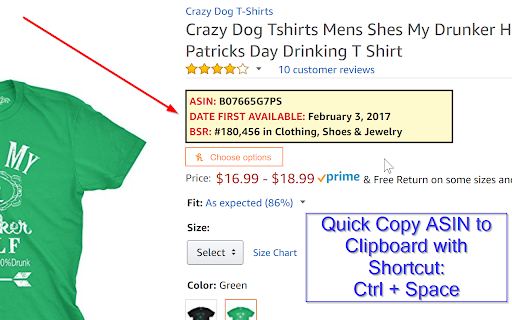
* Display Parent ASIN, Date First Available, and BSR in an easy to see box near the top of product pages.
- Works on most Clothing and Sports & Outdoor style product pages
* Quickly copy ASIN(s) to clipboard with suggested shortcut (Ctrl + Space)
- Works on Amazon Product Page, Search Results Page and Merch dashboard Manage page
* Quickly copy Product URL(s) to clipboard with suggested shortcut (Ctrl+Shift+Space)
- Works on same pages as ASIN copy
* Quickly copy all Suggested Manual Keywords from an AMS Campaign (Ctrl + Space)
| 分类 | 📝工作流程与规划 |
| 插件标识 | ooemdibhakkbnhjhfmanckjnafiklfjo |
| 平台 | Chrome |
| 评分 |
☆☆☆☆☆
|
| 评分人数 | |
| 插件主页 | https://chromewebstore.google.com/detail/merch-mastermind-toolkit/ooemdibhakkbnhjhfmanckjnafiklfjo |
| 版本号 | 1.7.4 |
| 大小 | 782KiB |
| 官网下载次数 | 1000 |
| 下载地址 | |
| 更新时间 | 2018-07-18 00:00:00 |
CRX扩展文件安装方法
第1步: 打开Chrome浏览器的扩展程序
第2步:
在地址栏输入: chrome://extensions/
第3步: 开启右上角的【开发者模式】
第4步: 重启Chrome浏览器 (重要操作)
第5步: 重新打开扩展程序管理界面
第6步: 将下载的crx文件直接拖入页面完成安装
注意:请确保使用最新版本的Chrome浏览器