
REAAAAAAYE Chrome 插件, crx 扩展下载
Displays transport times from the property to your work, lists local nearby train stations. For realestate.com.au property pages
Inserts helpful information into the realestate.com.au site's property listing pages. Gives you insight into different transport mode times from your place of work to the property.
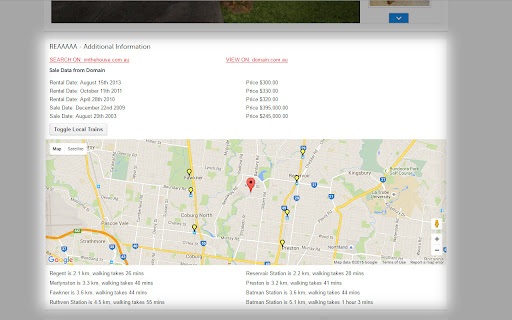
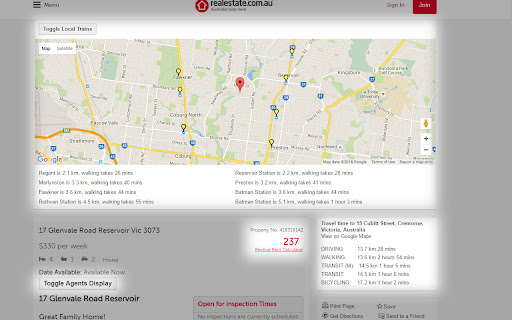
Provides a map with the closest train stations and their walking distances from the property address.
Provides transport times and distances to your place of work to the property (once set in the plugin options). These include driving, biking, transit & walking. Provides a suggested leaving time for work when taking transit on a Monday with traffic.
It also provides links to a pre-loaded search for onthehouse.com.au with the property address which provides additional data realesetate.com.au doesn't currently offer.
Where available, it will try and pull in the sales data from domain.com.au.
It collapses the agent display block and can be shown with a toggle to reduce scrolling.
It will also expand out the property view count, which is helpful to get a sense of how popular that property is.
| 分类 | 📝工作流程与规划 |
| 插件标识 | opdamfpopfibebmdplfhibjeappnicje |
| 平台 | Chrome |
| 评分 |
☆☆☆☆☆
|
| 评分人数 | |
| 插件主页 | https://chromewebstore.google.com/detail/reaaaaaaye/opdamfpopfibebmdplfhibjeappnicje |
| 版本号 | 25.2.3.0 |
| 大小 | 217KiB |
| 官网下载次数 | 6 |
| 下载地址 | |
| 更新时间 | 2016-05-29 00:00:00 |
CRX扩展文件安装方法
第1步: 打开Chrome浏览器的扩展程序
第2步:
在地址栏输入: chrome://extensions/
第3步: 开启右上角的【开发者模式】
第4步: 重启Chrome浏览器 (重要操作)
第5步: 重新打开扩展程序管理界面
第6步: 将下载的crx文件直接拖入页面完成安装
注意:请确保使用最新版本的Chrome浏览器