
CB Bookmark Tab - Extension For Chrome Chrome 插件, crx 扩展下载
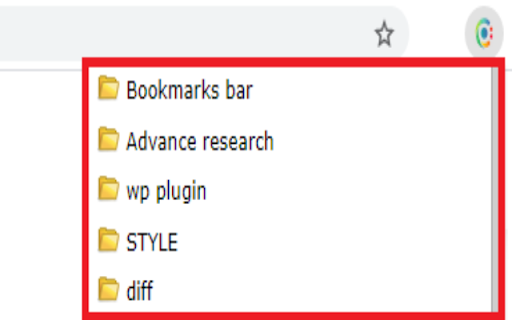

Arrange bookmark items in an stylish Look. Replace that big bookmark bar with a CB Bookmart tab icon and open only when needed.
Don't you feel bookmark bar and its folders irritating while you are browsing?
Add a toggleable Icon with all your bookmarks at the top right corner of your browser window.
Now Say Good bye to Bookmark bar :)
*************************************
Now CB Bookmarking tab will arrange and manage your bookmarks.
Utilize more browsing space simply by removing your Bookmark bar.
**************************
* Press Ctrl + Shift + B *
**************************
How to use CB Bookmark Tab Extension
1. Click on Add to chrome button on this page above this description.
(you will see an icon added to your chrome at top right corner)
2. Click on it.
3 Now add/edit/remove these from the CB Bookmark Tab Popup
*************************************
Why should you Add "CB Bookmark Tab"
* Student -- If you are a Student then you can arrange your files and assignments in a systematic way.
* SEO -- This is most important tool for you as most of the time your bookmark bar have lots of stuff and you need to arrange them in a systematic way folder-wise like Dictionary/profile submission, Google sheets, Clients, important tools like ahref, ubersugest, and many more.
* Teacher -- Again you need to Arrange tutorials and assignments in a date wise folders, sub-folder
* You-tuber -- you need this tool too to manage a playlist URL list, video list, no. of tutorials and tools list, thumbnail editing sites
* Web developer -- I need not to explain as i am in this profession. I have more than 200 bookmarks and i manage then in such a small tab. and i need more space and clean screen while programming.
**************************************************************
* I would love to bring more solutions for you share *
* your comments and reviews below how you feel to use it.*
* But before this use it properly. *
* Also explore options by right click on Bookmark tab. *
***************************************************************
Whats the next you want us to Develop for you?
Share it with us. We love you all. We are working here for you. :)
This extensions allows you to access your bookmarks by clicking on our icon at top right corner of your screen. You can edit, delete or rearrange your bookmarks by drag&drop and view some information about them by just clicking them with your left mouse key. You can check your bookmarks for updated or broken URLs, too.
If you found a bug, have ideas for features or improvements, please let us know.
| 分类 | 📝工作流程与规划 |
| 插件标识 | oplnilfhccnffbdeibojhknodjbffnik |
| 平台 | Chrome |
| 评分 |
☆☆☆☆☆
|
| 评分人数 | |
| 插件主页 | https://chromewebstore.google.com/detail/cb-bookmark-tab-extension/oplnilfhccnffbdeibojhknodjbffnik |
| 版本号 | 25.2.3.0 |
| 大小 | 91.84KiB |
| 官网下载次数 | 30 |
| 下载地址 | |
| 更新时间 | 2020-09-21 00:00:00 |
CRX扩展文件安装方法
第1步: 打开Chrome浏览器的扩展程序
第2步:
在地址栏输入: chrome://extensions/
第3步: 开启右上角的【开发者模式】
第4步: 重启Chrome浏览器 (重要操作)
第5步: 重新打开扩展程序管理界面
第6步: 将下载的crx文件直接拖入页面完成安装
注意:请确保使用最新版本的Chrome浏览器