
PlayStation Store & Library - Enhanced Chrome 插件, crx 扩展下载
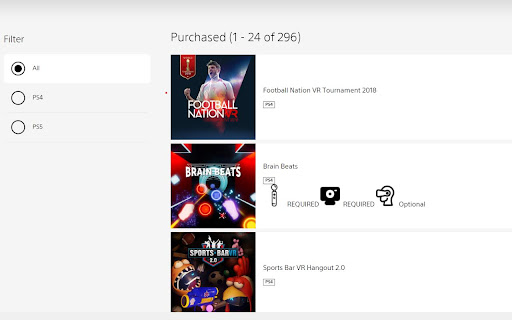
Sorts your library and marks your VR/Move/Aim/Camera games. Also adds gameplay video to every game(single) page
Made this extension only cuz I needed it myself. Its wonky and rough edged, so, be surprised :D !
Got tired of going thru my game library and checking which ones are Virtual Reality games or Camera/Move enabled.
This extension does:
* Scan all your PS games on https://library.playstation.com and will mark games that are: VR/Move/Aim/Camera
* Scans all games on PlayStation Store and marks games that are: VR/Move/Aim/Camera
* Adds gameplay video from youtube to every game page
| 分类 | 🎉趣味休闲 |
| 插件标识 | pbncgeiaoekidiljdbngikojhaekfdkc |
| 平台 | Chrome |
| 评分 |
☆☆☆☆☆
|
| 评分人数 | |
| 插件主页 | https://chromewebstore.google.com/detail/playstation-store-library/pbncgeiaoekidiljdbngikojhaekfdkc |
| 版本号 | 3.0.0.18 |
| 大小 | 233KiB |
| 官网下载次数 | 114 |
| 下载地址 | |
| 更新时间 | 2022-08-07 00:00:00 |
CRX扩展文件安装方法
第1步: 打开Chrome浏览器的扩展程序
第2步:
在地址栏输入: chrome://extensions/
第3步: 开启右上角的【开发者模式】
第4步: 重启Chrome浏览器 (重要操作)
第5步: 重新打开扩展程序管理界面
第6步: 将下载的crx文件直接拖入页面完成安装
注意:请确保使用最新版本的Chrome浏览器