
YouTube Party Chrome 插件, crx 扩展下载

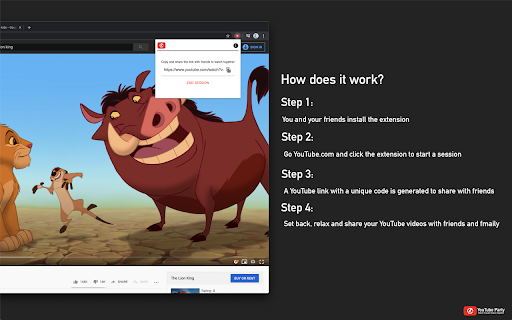

YouTube party lets you sync your YouTube experience with friends. Watch, play and seek videos with friends over the internet.
YouTube party lets you sync your YouTube experience with friends. Watch, play and seek videos with friends over the internet.
Watch YouTube Videos with your friends and family during quarantine!
The steps are simple:
* You and friends install the extension.
* Press the extension's icon on the top right of your browser.
* Start a session.
* Give your friends the generated YouTube link.
* Have them just navigate to the link in the browser.
* Enjoy watching YouTube together!
You like the extension? buy me a coffee (btw, you don't have to <3) - https://www.buymeacoffee.com/yezenalnafei
----
Release Notes:
We always listen to your feedback and make it happen.
v0.5.1:
* Fixes an issue when YouTube redirects the url without party ID
* Minor improvements
v0.5.0:
* Adds indicator to show if the YouTube party is on/active.
* Minor improvements
v0.4.0:
* Redesigned layout
* Minor improvements
v0.3.0:
* Only change the url when its a watch one.
* Don't worry about not being in sync with friends when they seek due to slow/bad internet, now we put a mechanism to sync everybody at the same time.
* Reduced package size.
| 分类 | 👥社交 |
| 插件标识 | pcdocoohpenibkkkfigkgelhpbeogimb |
| 平台 | Chrome |
| 评分 |
☆☆☆☆☆
|
| 评分人数 | |
| 插件主页 | https://chromewebstore.google.com/detail/youtube-party/pcdocoohpenibkkkfigkgelhpbeogimb |
| 版本号 | 0.5.2 |
| 大小 | 176KiB |
| 官网下载次数 | 8000 |
| 下载地址 | |
| 更新时间 | 2021-07-09 00:00:00 |
CRX扩展文件安装方法
第1步: 打开Chrome浏览器的扩展程序
第2步:
在地址栏输入: chrome://extensions/
第3步: 开启右上角的【开发者模式】
第4步: 重启Chrome浏览器 (重要操作)
第5步: 重新打开扩展程序管理界面
第6步: 将下载的crx文件直接拖入页面完成安装
注意:请确保使用最新版本的Chrome浏览器