
Fast Attendance Chrome 插件, crx 扩展下载
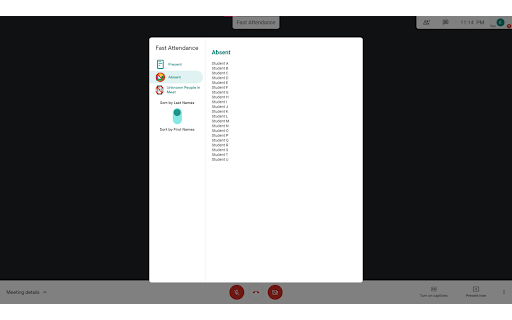
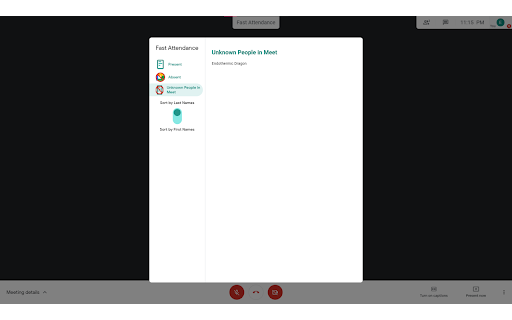
Take attendance from Google Meet with the click of a button! Integrated with times + days of the week - enter once, and you're done!
----- Version 0.0.0.2 Update -----
This extension has been updated to function accordingly with the new Google Meet UI.
The extension's functionality is no longer limited to 49 participants - it is now capable of getting all the participant names, without user interaction to change any layouts. Credit to Grégoire Geis - https://gist.github.com/71/7296ec9d44af7d0f1fb36b053bbe2219.
----- Description -----
Having trouble taking attendance? Frustrated that you have to take it every single day manually during class?
This extension lets you take attendance in Google Meet with the click of a button! Everything is integrated with times and days of the week, so you don't have to re-enter names, and everything syncs automatically.
Why is this better than any other extension, you ask? Well, this extension allows you to have a different schedule for each day of the week. Everything rotates from one time to the next during the day, and one day to the next throughout the week. Set it up once, and you're done!
After installation, click the extension logo to edit your days and schedule. From here, you can copy all the student names and times from one day to another if need be, or you can manually add classes and times.
When in a Google Meet, just click the button at the top of your screen that says "Fast Attendance", and you can see who is present, who is absent, and who is not recognized from the attendance list and Google Meet. The extension will do the work for you by taking the appropriate list of students, based on the current day of the week and time of the day, and comparing it to the list of students in the Google Meet.
Note that no data is sent anywhere - it is confidential to devices with your google account logged in only.
Uploading students from Google Classroom is not implemented yet, but possibility for the future!
Questions? Concerns? Bugs? Feature requests? Feel free to email me at [email protected]!
| 分类 | 📝工作流程与规划 |
| 插件标识 | pddjapkopnopnopijbpnickgdfjclabg |
| 平台 | Chrome |
| 评分 |
☆☆☆☆☆
|
| 评分人数 | |
| 插件主页 | https://chromewebstore.google.com/detail/fast-attendance/pddjapkopnopnopijbpnickgdfjclabg |
| 版本号 | 1.0.0 |
| 大小 | 23.19KiB |
| 官网下载次数 | 223 |
| 下载地址 | |
| 更新时间 | 2021-07-02 00:00:00 |
CRX扩展文件安装方法
第1步: 打开Chrome浏览器的扩展程序
第2步:
在地址栏输入: chrome://extensions/
第3步: 开启右上角的【开发者模式】
第4步: 重启Chrome浏览器 (重要操作)
第5步: 重新打开扩展程序管理界面
第6步: 将下载的crx文件直接拖入页面完成安装
注意:请确保使用最新版本的Chrome浏览器