
Domain whitelist Chrome 插件, crx 扩展下载
World's smallest interactive ad blocker, only allow requests from user-defined list of domains.
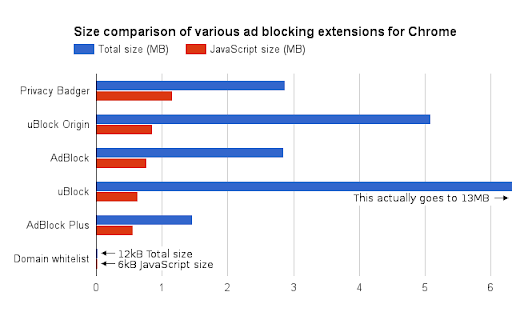
Domain whitelist (DW) is worlds smallest interactive ad blocker.
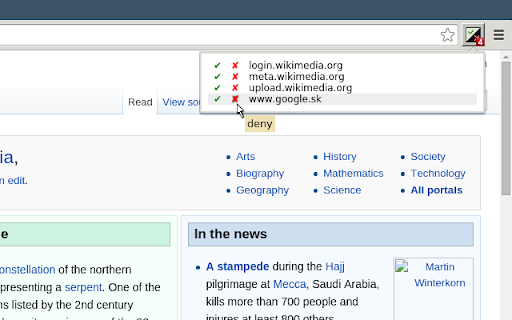
It blocks all HTTP requests. If you want to see some website,
you must explicitly allow its domain (in popup window displayed
when you click on DW button). After you install DW, first few
hours will be very intense! It's not for everybody.
DW is extremely small, the source code has only 5 kB. This is
extremely important because now anybody can read the source
and understand it. The best way how to use DW is to create
your own extension based on it, because when it comes to ad
blocking, you should not trust anyone. Not even me!
DW is distributed under GNU GPL licence version 3 or later.
Please report bugs to [email protected].
| 分类 | 📝工作流程与规划 |
| 插件标识 | pdfmaijcdceohdpbclfdidiobpfpdkda |
| 平台 | Chrome |
| 评分 |
☆☆☆☆☆
|
| 评分人数 | |
| 插件主页 | https://chromewebstore.google.com/detail/domain-whitelist/pdfmaijcdceohdpbclfdidiobpfpdkda |
| 版本号 | 25.2.3.0 |
| 大小 | 12.3KiB |
| 官网下载次数 | 228 |
| 下载地址 | |
| 更新时间 | 2020-04-27 00:00:00 |
CRX扩展文件安装方法
第1步: 打开Chrome浏览器的扩展程序
第2步:
在地址栏输入: chrome://extensions/
第3步: 开启右上角的【开发者模式】
第4步: 重启Chrome浏览器 (重要操作)
第5步: 重新打开扩展程序管理界面
第6步: 将下载的crx文件直接拖入页面完成安装
注意:请确保使用最新版本的Chrome浏览器