
OVPN.com Chrome 插件, crx 扩展下载
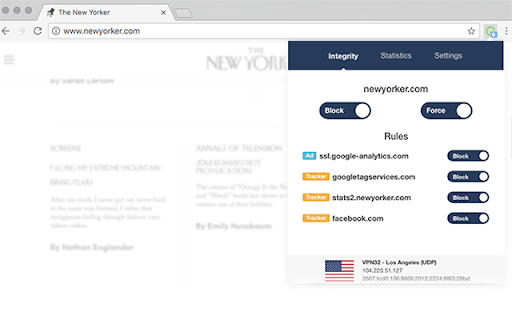
The extension is the perfect complement to OVPN. Block ads & trackers and require a VPN connection in order to visit certain domains
Never visit a website without VPN again
There are some websites you simply don't want to visit without being protected by OVPN. The OVPN browser extension helps you remember just that.
Any and all requests to those websites are blocked ensuring your anonymity and privacy.
WebRTC IP address leak
Your private IP address can leak through WebRTC even when connected to OVPN. The extension protects you against such leaks without entirely disabling WebRTC meaning you can still reap the benefits of WebRTC.
Control your data
Block companies tracking and profiling your browsing habits without your consent. The extension blocks analytics trackers ensuring your browsing stays private.
The power is now in your hands - you get to decide which companies, if any, that gets your data.
Purge cookies & local storage
Remove cookies stored on your computer as soon as you leave a certain website. Never again will you see obtrusive retargeting ads on social media.
Remove unwanted noise
Thousands of advertisements are removed so you can focus on the content you are actually looking for.
Also enjoy higher browsing speed as unnecessary requests are blocked by the extension.
| 分类 | 📝工作流程与规划 |
| 插件标识 | pgogbeeleccaogghlpmoilbegdhacfnn |
| 平台 | Chrome |
| 评分 |
☆☆☆☆☆
|
| 评分人数 | |
| 插件主页 | https://chromewebstore.google.com/detail/ovpncom/pgogbeeleccaogghlpmoilbegdhacfnn |
| 版本号 | 0.8.2 |
| 大小 | 1.74MiB |
| 官网下载次数 | 6000 |
| 下载地址 | |
| 更新时间 | 2020-10-01 00:00:00 |
CRX扩展文件安装方法
第1步: 打开Chrome浏览器的扩展程序
第2步:
在地址栏输入: chrome://extensions/
第3步: 开启右上角的【开发者模式】
第4步: 重启Chrome浏览器 (重要操作)
第5步: 重新打开扩展程序管理界面
第6步: 将下载的crx文件直接拖入页面完成安装
注意:请确保使用最新版本的Chrome浏览器