
AmIUnique Chrome 插件, crx 扩展下载
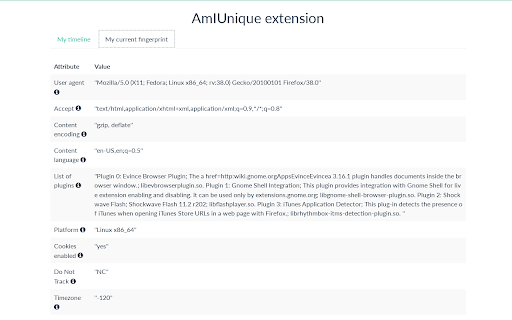
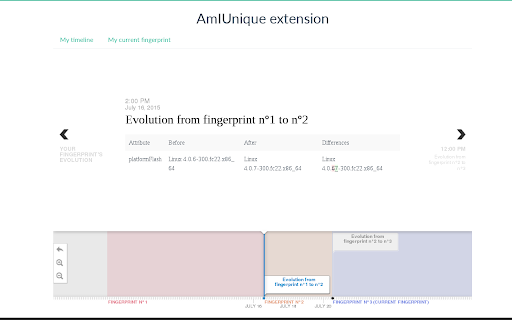
An extension to follow the evolution of your browser fingerprint! Be notified as soon as a change is detected!
Features
With this extension, we give you tools to better understand your browser fingerprint.
Keep track of your fingerprint's evolution through time! With your very own personalized timeline, you can retrace all the changes that took place since you install the extension. The addon will notify as soon as a change is detected. But that's not all! We plan to add in the near future new features to improve your anonymity with regard to fingerprinting.
Our mission
The AmIUnique.org website is launching its own extension to further improve our understanding of browser fingerprints! With more than 100,000 collected fingerprints on our website (and counting!), we learned a lot about the current diversity of fingerprints. However, a small piece of the puzzle is missing: an analysis of their temporal evolution. We do not know how they evolve and how fast they can change with time. This extension is the answer. With it, you help us collect daily data on your fingerprint to shed light on this relatively unknown subject.
Links
View your own fingerprint: https://amiunique.org/fp
Our statistics on the fingerprints we collected so far: https://amiunique.org/stats
Our collection of recommended tools: https://amiunique.org/tools
Do you have any issues to report or do you want to contribute?
Our repository is on Github: https://github.com/plaperdr/amiunique-extension-chrome
| 分类 | 🛠️工具 |
| 插件标识 | pigjfndpomdldkmoaiiigpbncemhjeca |
| 平台 | Chrome |
| 评分 |
☆☆☆☆☆
|
| 评分人数 | |
| 插件主页 | https://chromewebstore.google.com/detail/amiunique/pigjfndpomdldkmoaiiigpbncemhjeca |
| 版本号 | 1.0.0.47 |
| 大小 | 164KiB |
| 官网下载次数 | 3000 |
| 下载地址 | |
| 更新时间 | 2021-02-17 00:00:00 |
CRX扩展文件安装方法
第1步: 打开Chrome浏览器的扩展程序
第2步:
在地址栏输入: chrome://extensions/
第3步: 开启右上角的【开发者模式】
第4步: 重启Chrome浏览器 (重要操作)
第5步: 重新打开扩展程序管理界面
第6步: 将下载的crx文件直接拖入页面完成安装
注意:请确保使用最新版本的Chrome浏览器