
Export HumbleBundle Library to JSON Chrome 插件, crx 扩展下载
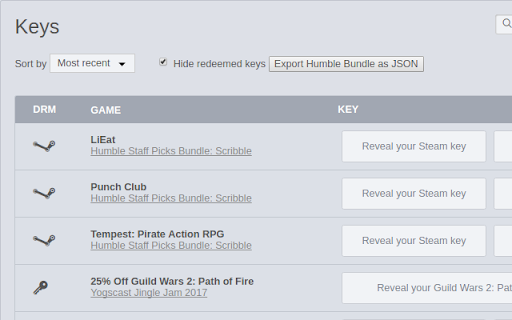
Store information of all your unredeemed games from humblebundle.com in JSON file
Steps to use:
1. Install this extension
2. Go to https://www.humblebundle.com/home/keys (need to be logged in at humblebundle.com)
3. Click on the `Export Humble Bundle as JSON` button above your list of games.
You should now have a file `Humble_Bundle_Games.json` saved through chrome as a local file on you pc.
If not, press F12, select and copy errors there from Console and paste them in a new issue at https://github.com/jtara1/ExportHumbleBundleLibrary/issues or report issue via feedback through chrome web store.
sample output: https://pastebin.com/X7jk9buh
support me and my projects
https://ko-fi.com/jtara1
| 分类 | 💻开发者工具 |
| 插件标识 | pkkkphehloknahihekpiaemeaajpbflm |
| 平台 | Chrome |
| 评分 |
☆☆☆☆☆
|
| 评分人数 | |
| 插件主页 | https://chromewebstore.google.com/detail/export-humblebundle-libra/pkkkphehloknahihekpiaemeaajpbflm |
| 版本号 | 8.3 |
| 大小 | 13.25KiB |
| 官网下载次数 | 267 |
| 下载地址 | |
| 更新时间 | 2020-05-17 00:00:00 |
CRX扩展文件安装方法
第1步: 打开Chrome浏览器的扩展程序
第2步:
在地址栏输入: chrome://extensions/
第3步: 开启右上角的【开发者模式】
第4步: 重启Chrome浏览器 (重要操作)
第5步: 重新打开扩展程序管理界面
第6步: 将下载的crx文件直接拖入页面完成安装
注意:请确保使用最新版本的Chrome浏览器