
Wikipedia Peek Chrome 插件, crx 扩展下载
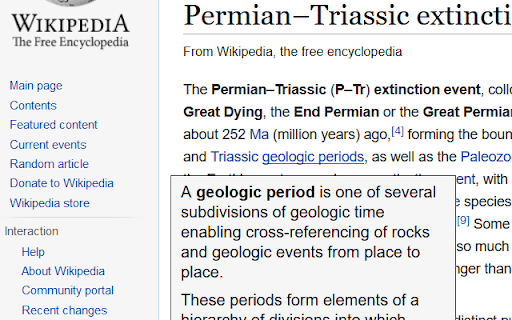
Shows previews of linked articles on Wikipedia pages
When you hover a link to another article on Wikipedia.org/Wikia.com or tap on it, a small pop-up will show you the title section of that article.
Features:
* Full touch support
* Load first paragraph and thumbnail
* 4 themes (Wikipedia, white, black, grey/blue)
* Customizable font-size and transparency
* Works in Chrome, Firefox, Opera and Firefox for Android
This add-ons code is available on GitHub (https://github.com/NiklasGollenstede/wikipedia-peek). If you have any problems, please report them there (https://github.com/NiklasGollenstede/wikipedia-peek/issues).
The add-on itself does not collect any data. Note however, that the article previews are queried form the target host in a separate query each time you hover over a link long enough.
| 分类 | 🛠️工具 |
| 插件标识 | planddpadjimakmjdpnolpjjphhooiej |
| 平台 | Chrome |
| 评分 |
☆☆☆☆☆
|
| 评分人数 | |
| 插件主页 | https://chromewebstore.google.com/detail/wikipedia-peek/planddpadjimakmjdpnolpjjphhooiej |
| 版本号 | 1.7.1 |
| 大小 | 64.71KiB |
| 官网下载次数 | 293 |
| 下载地址 | |
| 更新时间 | 2016-09-08 00:00:00 |
CRX扩展文件安装方法
第1步: 打开Chrome浏览器的扩展程序
第2步:
在地址栏输入: chrome://extensions/
第3步: 开启右上角的【开发者模式】
第4步: 重启Chrome浏览器 (重要操作)
第5步: 重新打开扩展程序管理界面
第6步: 将下载的crx文件直接拖入页面完成安装
注意:请确保使用最新版本的Chrome浏览器