
Dot Phishing Protector Chrome 插件, crx 扩展下载
This extension protects yourself against punycode domains phishing attacks.
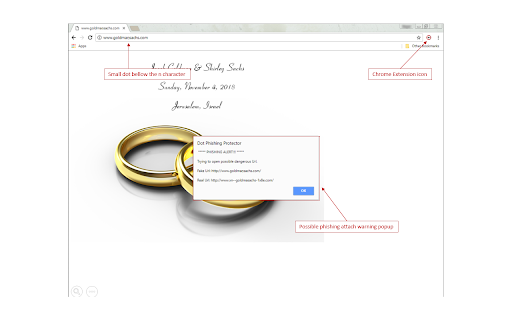
This extension protects yourself against punycode domains phishing attacks that try to impersonate well known sites (including most banks online) by replacing some letters with the same character with a small dot bellow, that most people ignore/don't notice it.
In a real phishing attack (using this method), the little dot may be confused with a dead pixel or some dust on the screen.
As an example you may consider the following domain:
http://www.xn--goldmasachs-1x8e.com/
Despict the small do bellow the lowercase N character, it might be easily confused with:
http://www.goldmansachs.com/
This extension will provide a warning dialog every time the browser tries to open Urls domains that are punycode encoded, which may be used to trick the user.
| 分类 | 👥社交 |
| 插件标识 | plhkgdgglhonnlckmigoohlmghiiepdo |
| 平台 | Chrome |
| 评分 |
☆☆☆☆☆
|
| 评分人数 | |
| 插件主页 | https://chromewebstore.google.com/detail/dot-phishing-protector/plhkgdgglhonnlckmigoohlmghiiepdo |
| 版本号 | 3.128.4 |
| 大小 | 8.17KiB |
| 官网下载次数 | 13 |
| 下载地址 | |
| 更新时间 | 2018-01-20 00:00:00 |
CRX扩展文件安装方法
第1步: 打开Chrome浏览器的扩展程序
第2步:
在地址栏输入: chrome://extensions/
第3步: 开启右上角的【开发者模式】
第4步: 重启Chrome浏览器 (重要操作)
第5步: 重新打开扩展程序管理界面
第6步: 将下载的crx文件直接拖入页面完成安装
注意:请确保使用最新版本的Chrome浏览器