
Tricky Chaos Kit Chrome 插件, crx 扩展下载
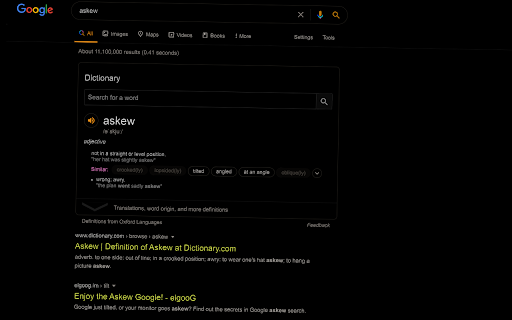
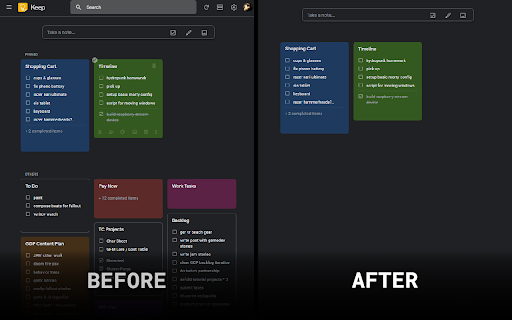
Make web less distracting with a key. Press F2 to switch to dark mode anywhere or to enable custom style in certain places. IDDQD.
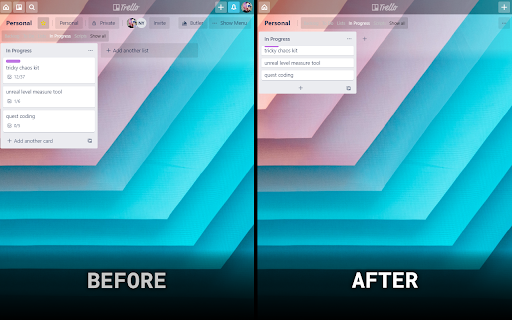
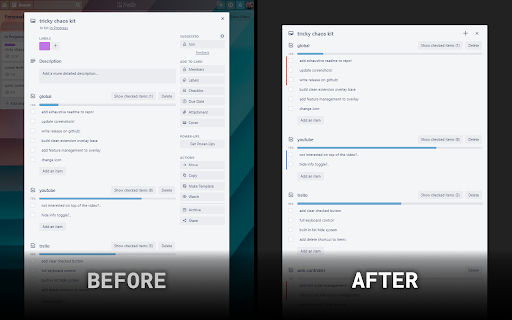
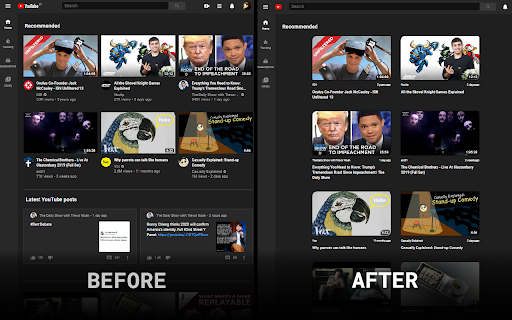
Click on extension or press F2 to toggle "dark mode" for bright websites. On certain websites such as Trello, YouTube or PH it will instead enable a custom style hiding most elements & making web less distracting.
Trello Card View:
- Makes background opaque
- Hides everything except for checklists and description
- Adds small "new checklist" button
- Turns "hide checked items" on each checklist by default
- Adds checklist item marking if it ends with "!" or "?"
- Adds solo / mute buttons on checklists
- Adds multimute button
- Adds "toggle all" button to checklists
- Replaces text on checklist buttons with icons
Trello Board View:
- Simplifies cards as much as possible
- Removes most of the HUD elements
YouTube List Views:
- Side bar is hidden by default
- Top bar simplified
- Grid video view heavily simfilified & unified between the screens
YouTube Video View:
- Hides most of the elements on the screen (comments, related, meta,..)
- Simplifies title and action buttons (like, dislike, share, add)
Google Keep Card View:
- Makes background opaque
- Hides top bar
- Hides non-pinned cards
Pastebin:
- Hides a lot of UI
- Adds post builder & drafts
- Adds quick copy button
Have fun!
To be continued...
| 分类 | 📝工作流程与规划 |
| 插件标识 | poadpmgjfkflfgpaeklfiiolcgciilpf |
| 平台 | Chrome |
| 评分 |
☆☆☆☆☆
|
| 评分人数 | |
| 插件主页 | https://chromewebstore.google.com/detail/tricky-chaos-kit/poadpmgjfkflfgpaeklfiiolcgciilpf |
| 版本号 | 25.2.3.0 |
| 大小 | 738KiB |
| 官网下载次数 | 22 |
| 下载地址 | |
| 更新时间 | 2023-08-31 00:00:00 |
CRX扩展文件安装方法
第1步: 打开Chrome浏览器的扩展程序
第2步:
在地址栏输入: chrome://extensions/
第3步: 开启右上角的【开发者模式】
第4步: 重启Chrome浏览器 (重要操作)
第5步: 重新打开扩展程序管理界面
第6步: 将下载的crx文件直接拖入页面完成安装
注意:请确保使用最新版本的Chrome浏览器