
Azure DevOps Tracker Chrome 插件, crx 扩展下载
Track your favourite Azure DevOps work items.
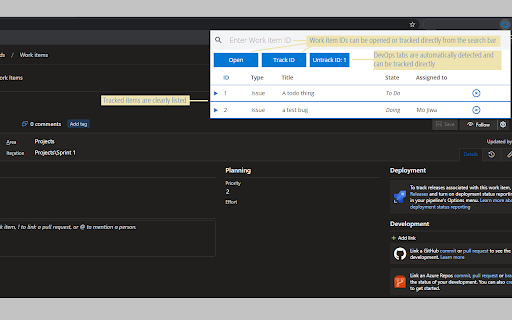
This extension allows the user to navigate to and track Azure DevOps work items based on their ID.
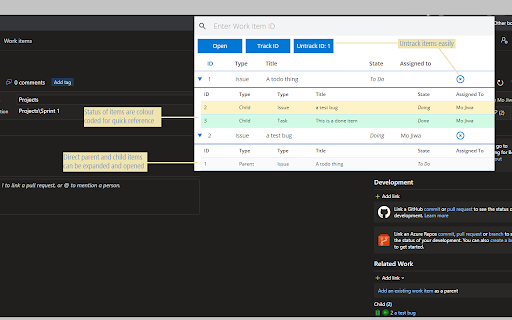
The tracking of items also allows the user to be able to see related child and parent items by expanding on a tracked node.
Tracked items are persisted and synced across your profiles.
This is an excellent tool for monitoring the most important work items to you, or for managing work items - giving you a clear overview of each item, its state and current progress - as well as who is assigned to it.
| 分类 | 📝工作流程与规划 |
| 插件标识 | pofdeeafbmacahfijoccmnkkakogieec |
| 平台 | Chrome |
| 评分 |
☆☆☆☆☆
|
| 评分人数 | |
| 插件主页 | https://chromewebstore.google.com/detail/azure-devops-tracker/pofdeeafbmacahfijoccmnkkakogieec |
| 版本号 | 25.2.3.0 |
| 大小 | 360KiB |
| 官网下载次数 | 57 |
| 下载地址 | |
| 更新时间 | 2021-04-02 00:00:00 |
CRX扩展文件安装方法
第1步: 打开Chrome浏览器的扩展程序
第2步:
在地址栏输入: chrome://extensions/
第3步: 开启右上角的【开发者模式】
第4步: 重启Chrome浏览器 (重要操作)
第5步: 重新打开扩展程序管理界面
第6步: 将下载的crx文件直接拖入页面完成安装
注意:请确保使用最新版本的Chrome浏览器