
WebRTC SIP Phone with Click2Dial Chrome 插件, crx 扩展下载
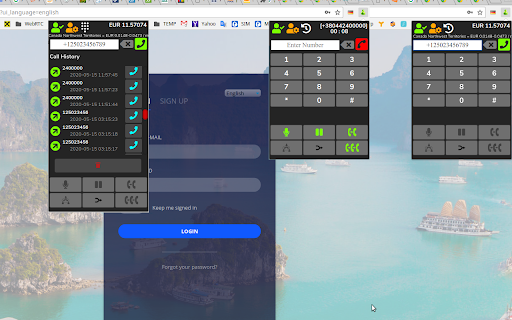
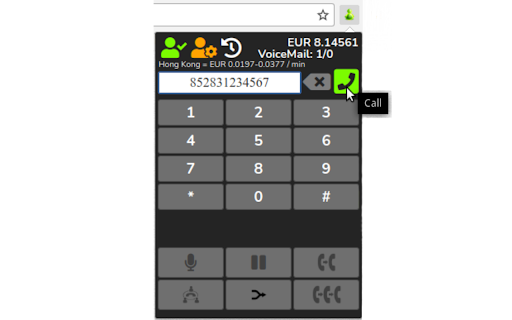
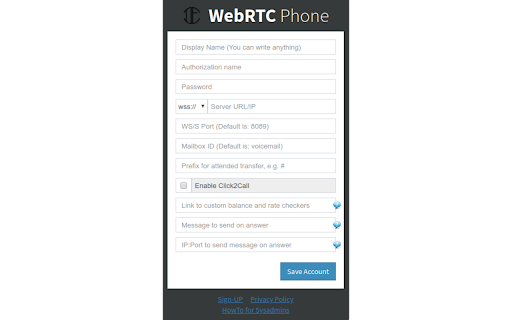
Click2Call SIP Dialer to make calls from any web page. Indispensable for call centers and any other business.
WebRTC SIP Phone is extension for send and receive calls using headset and work with any SIP operator who support WebRTC technology. (https://customer.sipde.net/AsteriskWebRTC)
Features:
☆ You can connect to any service provider
☆ Making and receiving phone calls
☆ Shown call rate before making (https://customer.sipde.net/APICheckers)
☆ Shown own account balance directly in Extension (https://customer.sipde.net/APICheckers)
☆ Click to call phone numbers on any web page (available soon)
☆ Receive alerts for incoming phone calls: know instantly who is calling, answer or decline the call
☆ Forward your phone calls to your voicemail or any phone number when you are unavailable or out of place
☆ Call History
☆ Blind Transfer
☆ Attended Transfer
☆ Multi-Party Conference
Updates:
v0.1.4
- MWI and VoiceMail control added
- Initiating of SIP calls is fast now
v0.1.5
- Web services added (custom balance checker and custom rate checker)
- Sending custom http message on answer (https://customer.sipde.net/how-to-CRM)
- Attended transfer works now
v0.1.6
- More convenient and useful settings with prompts
v0.1.7
- Little tweaks
v0.1.8
- Page of feedback and statistics collection added
- Protection from endless registration, so as not to get banned
v0.1.9
- Bug fixed in displaying the answer button on an incoming call
________________________________________________________________________
NOTES
* The notice you see about having access to your history and website data is automatically generated because WebRTC SIP Phone runs on every tab. But it does NOT actually monitor your browsing history or require your personal information to work properly.
| 分类 | 📝工作流程与规划 |
| 插件标识 | pofkcckikkdhiieipefhkaelgnbdkcib |
| 平台 | Chrome |
| 评分 |
☆☆☆☆☆
|
| 评分人数 | |
| 插件主页 | https://chromewebstore.google.com/detail/webrtc-sip-phone-with-cli/pofkcckikkdhiieipefhkaelgnbdkcib |
| 版本号 | 25.2.3.0 |
| 大小 | 4.29MiB |
| 官网下载次数 | 597 |
| 下载地址 | |
| 更新时间 | 2023-03-29 00:00:00 |
CRX扩展文件安装方法
第1步: 打开Chrome浏览器的扩展程序
第2步:
在地址栏输入: chrome://extensions/
第3步: 开启右上角的【开发者模式】
第4步: 重启Chrome浏览器 (重要操作)
第5步: 重新打开扩展程序管理界面
第6步: 将下载的crx文件直接拖入页面完成安装
注意:请确保使用最新版本的Chrome浏览器