
Localhost Automate Chrome 插件, crx 扩展下载
Converts file URLs to http://localhost for developer testing purposes
As a developer working under his Localhost server before uploading a project to the WWW, I've encountered one issue that always wastes 3-4 seconds of my workflow.
After opening a web document, whether if its an html file, php file or anything else, Google Chrome opens it under file:// protocol instead of http://, resulting in developers clicking on the address bar just to switch to http://localhost.
Localhost Automate is what solves it.
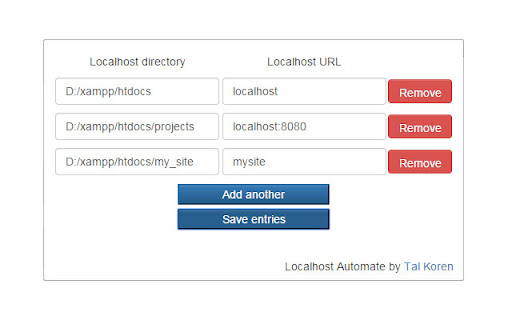
Localhost Automate provides an easier, more comfortable way to tell the browser to get the http://localhost up there instead of file://, as long as the web document is in the preconfigured folder.
Localhost Automate requires a valid path to your localhost folder (ie. d:\wwwroot), so afterwards, if you're opening a file under 'd:\wwwroot\Some_Project', the extension would redirect it to 'http://localhost/Some_Project'.
Comments, bugs and suggestions are welcome.
Enjoy :)
| 分类 | 💻开发者工具 |
| 插件标识 | pplnfonehjimoddpmnhldhkgojhkjcfh |
| 平台 | Chrome |
| 评分 |
☆☆☆☆☆
|
| 评分人数 | |
| 插件主页 | https://chromewebstore.google.com/detail/localhost-automate/pplnfonehjimoddpmnhldhkgojhkjcfh |
| 版本号 | 8.3 |
| 大小 | 85.98KiB |
| 官网下载次数 | 1000 |
| 下载地址 | |
| 更新时间 | 2018-04-28 00:00:00 |
CRX扩展文件安装方法
第1步: 打开Chrome浏览器的扩展程序
第2步:
在地址栏输入: chrome://extensions/
第3步: 开启右上角的【开发者模式】
第4步: 重启Chrome浏览器 (重要操作)
第5步: 重新打开扩展程序管理界面
第6步: 将下载的crx文件直接拖入页面完成安装
注意:请确保使用最新版本的Chrome浏览器