
PinBuddy Chrome 插件, crx 扩展下载
Browse your Pinboard bookmarks and add new ones with ease.
PinBuddy is a Google Chrome toolbar extension for the Pinboard (http://pinboard.in) bookmarking service that lets you browse and add new bookmarks with ease. It is fully keyboard accessible and highlights previously bookmarked websites. It uses API token to make a servers calls and never asks you for your password.
- browse and add bookmarks
- fully keyboard accessible
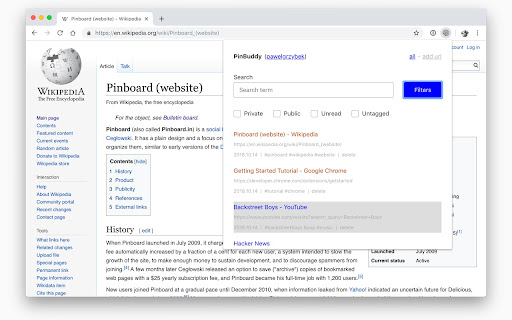
- filter all bookmarks (all view)
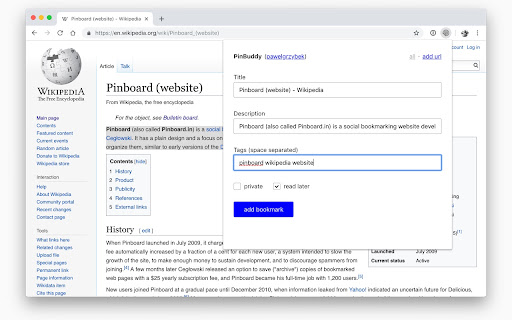
- fetch title from document title (add view)
- fetch description from user cursor selection (add view)
- detect URL that is already bookmarked
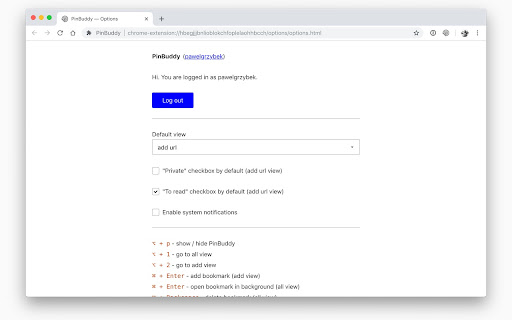
- default view configurable (options page)
- native system notifications configurable (options page)
- protocol detection
- offline detection
Detailed user manual:
https://pawelgrzybek.com/i-built-a-thing-pinbuddy/
| 分类 | 📝工作流程与规划 |
| 插件标识 | ppokjacfheflhaojmndcblibahmopkfl |
| 平台 | Chrome |
| 评分 |
☆☆☆☆☆
|
| 评分人数 | |
| 插件主页 | https://chromewebstore.google.com/detail/pinbuddy/ppokjacfheflhaojmndcblibahmopkfl |
| 版本号 | 3.0.0 |
| 大小 | 230KiB |
| 官网下载次数 | 28 |
| 下载地址 | |
| 更新时间 | 2018-10-31 00:00:00 |
CRX扩展文件安装方法
第1步: 打开Chrome浏览器的扩展程序
第2步:
在地址栏输入: chrome://extensions/
第3步: 开启右上角的【开发者模式】
第4步: 重启Chrome浏览器 (重要操作)
第5步: 重新打开扩展程序管理界面
第6步: 将下载的crx文件直接拖入页面完成安装
注意:请确保使用最新版本的Chrome浏览器