Selected text to speech Chrome 插件, crx 扩展下载
CRX扩展文件安装方法
第1步: 打开Chrome浏览器的扩展程序
第2步:
在地址栏输入: chrome://extensions/
第3步: 开启右上角的【开发者模式】
第4步: 重启Chrome浏览器 (重要操作)
第5步: 重新打开扩展程序管理界面
第6步: 将下载的crx文件直接拖入页面完成安装
注意:请确保使用最新版本的Chrome浏览器
同类插件推荐

Text to Speech
Speak the Text provided in input fieldA Simple tex

text reader: Convert text to voice easily
Convert text to voice and Read any page out loud e

语音合成扩展 - Panopreter.com
使用自然的语音朗读网页文字内容This text-to-speech extension reads

VoxReader - Text to Speech
VoxReader - личный помощник на основе инновационны

Offline Text To Speech
Convert your text to speech!Offline Text To Speech

Read Out Loud
This extension adds a play button beside selected

语音合成扩展 - Panopreter.com
使用自然的语音朗读网页文字内容Text-to-Speech extension by Panopre
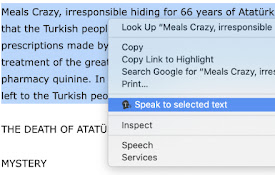
Selected text to speech
With this extension, you can speech to the selecte

ReadX Text To Speech
Text to speech ExtensionText to speech app. Reads

ReadText (Text to Speech Reader)
Single-click text-to-speech magic directly in your

Playtext — Text to Speech
Turn Articles into Audio. Read at 3x the speed! ⚡️

AI Voice Generator - Text to Speech (Read Aloud)
Read aloud any tex to lifelike speech using OpenAI

Read Easy
An easy to use text reader.Removes clutter and imp