
CrowdLog Calendar Sync Chrome 插件, crx 扩展下载
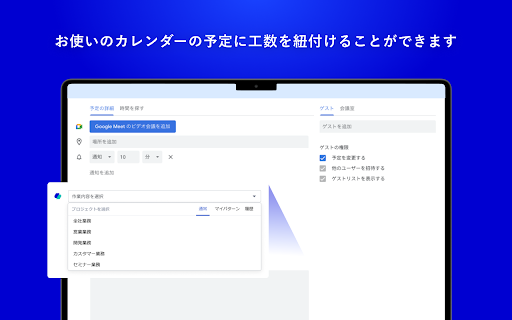

Register your daily man-hours on Google Calendar / Outlook Calendar.
You can select the projects registered in CrowdLog on Google Calendar/Outlook Calendar and reduce the time you spend on daily man-hour entry.
▼Click here to see how to use it https://support.crowdlog.jp/knowledge/integration-calendar-sync
■Terms of Use
You need to have an account for CrowdLog, which is a project management tool.
▼If you don't have an account yet, go to the following page.
https://www.crowdlog.jp/form/trial/
■What is "CrowdLog" ?
This is a cloud-based man-hour management tool.
-Easily enter your work hours and man-hours
You can enter work hours and man-hours with an intuitive drag-and-drop operation on the calendar.
You can also input data from your smartphone and link it to Google Calendar and Outlook Calendar.
-Visualize the work style of teams and individuals
You can automatically visualize the time spent on which tasks in which projects from the input data.
You will be able to understand the points that need to be streamlined in order to realize work style reform.
-Visualize profit for each project
You can manage the budget and actual results of sales, cost of sales, and expenses for each project
| 分类 | 📝工作流程与规划 |
| 插件标识 | aajlpbohkcfpmgeamipkmpllmgjmmmpa |
| 平台 | Chrome |
| 评分 |
★★★★☆
4.8
|
| 评分人数 | 21 |
| 插件主页 | https://chromewebstore.google.com/detail/crowdlog-calendar-sync/aajlpbohkcfpmgeamipkmpllmgjmmmpa |
| 版本号 | 3.6 |
| 大小 | 388KiB |
| 官网下载次数 | 4000 |
| 下载地址 | |
| 更新时间 | 2025-01-09 00:00:00 |
CRX扩展文件安装方法
第1步: 打开Chrome浏览器的扩展程序
第2步:
在地址栏输入: chrome://extensions/
第3步: 开启右上角的【开发者模式】
第4步: 重启Chrome浏览器 (重要操作)
第5步: 重新打开扩展程序管理界面
第6步: 将下载的crx文件直接拖入页面完成安装
注意:请确保使用最新版本的Chrome浏览器
同类插件推荐

CrowdLog Calendar Sync
Register your daily man-hours on Google Calendar /

Meeting Timer - for Google Meet
Display a Timer on Google Meet calls based on your

Google Calendar Disable Month Scroll
Disable jumping from month to month in Google Cale

Google Calendar Event Checker
Mark events as completed or cancelled in Google Ca