
X-Ray Hider for Amazon Prime Video Chrome 插件, crx 扩展下载
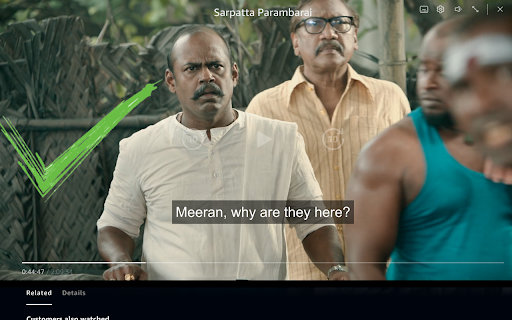
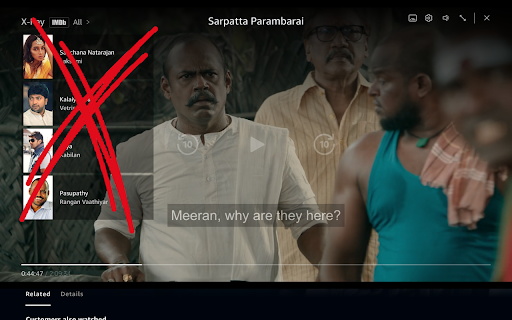
Automatically hide the X-Ray overlay on the paused screen of Amazon Prime Video for better viewing of subtitles and video content
Problem❗:
• Do you find the X-Ray overlay on Amazon Prime Video distracting when you pause a video and just want to focus on the subtitles and content? ?
• This overlay can obscure important information, making it hard to enjoy your viewing experience.
Solution ✅:
• This extension automatically hides the X-Ray overlay whenever you pause a video, allowing for clearer visibility of subtitles and content. ⏸️
• Enjoy uninterrupted viewing without the distraction of unnecessary overlays! ?
Feel free to share your thoughts and rate the extension if you found it helpful! ?
| 分类 | 🎬娱乐 |
| 插件标识 | acacknghohhlikeeopbmfcekfdcnjfjn |
| 平台 | Chrome |
| 评分 |
★★★★☆
4.2
|
| 评分人数 | 56 |
| 插件主页 | https://chromewebstore.google.com/detail/x-ray-hider-for-amazon-pr/acacknghohhlikeeopbmfcekfdcnjfjn |
| 版本号 | 1.0.1 |
| 大小 | 8.33KiB |
| 官网下载次数 | 69 |
| 下载地址 | |
| 更新时间 | 2024-10-05 00:00:00 |
CRX扩展文件安装方法
第1步: 打开Chrome浏览器的扩展程序
第2步:
在地址栏输入: chrome://extensions/
第3步: 开启右上角的【开发者模式】
第4步: 重启Chrome浏览器 (重要操作)
第5步: 重新打开扩展程序管理界面
第6步: 将下载的crx文件直接拖入页面完成安装
注意:请确保使用最新版本的Chrome浏览器
同类插件推荐
X-Ray Hider for Amazon Prime Video
Automatically hide the X-Ray overlay on the paused

Subtitles for Language Learning (Prime Video)
Add foreign language subtitle display and dictiona

Prime Video Picture In Picture
Extension to watch Prime Video in Picture in Pictu
拉近以填满 - 超宽视频
缩放视频,更改任何视频的纵横比,去除Netflix,Amazon Prime,YouTube,HBO