
Back up emails to SharePoint Chrome 插件, crx 扩展下载
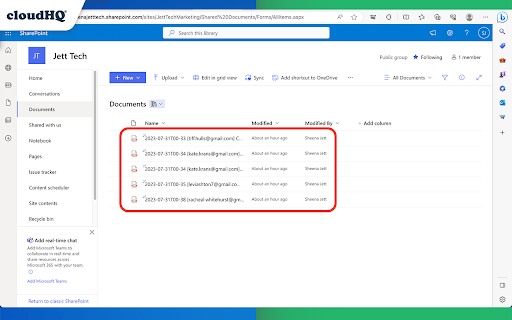

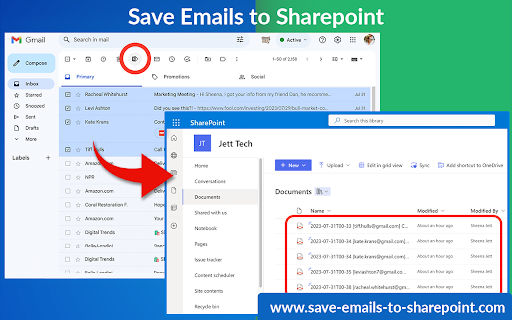
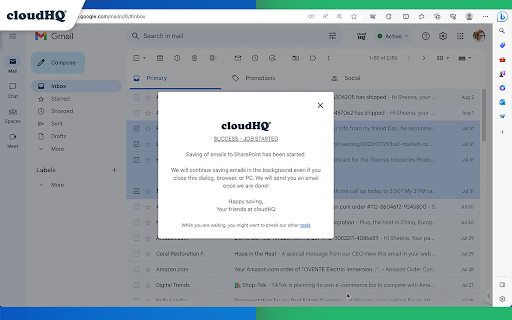
Save any Gmail emails or labels to Microsoft 365 SharePoint
This extension allows you to save your Gmail messages or labels directly to Microsoft 365 SharePoint with just one click.
This tool offers various functionalities like saving individual emails or in batches, archiving all emails at once, continuous automatic saving, and organization-wide email backup.
Here’s what you can do:
- Save individual emails, or in batches
- Label backup
- Archive all your emails
- Continuously save emails automatically
- Setup email backup
Here is how to use this extension:
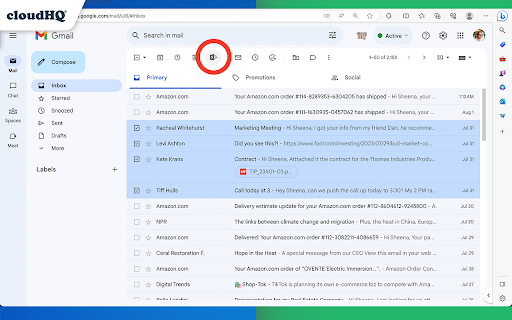
1. Select the emails you want to save.
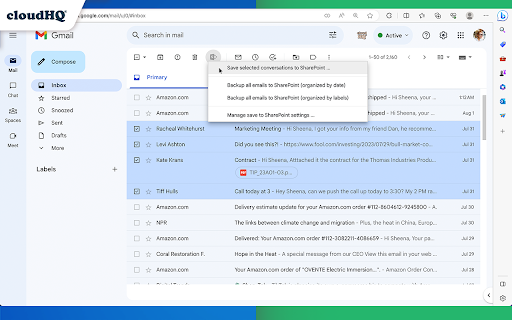
2. Click on the "Save Emails to SharePoint" icon, and select the SharePoint Site, Document Library, and folder.
3. Choose the email export options.
4. Click on "Save".
Key features:
- save any email to a folder in SharePoint Document Library
- save entire Gmail label to a folder in SharePoint Document Library
- setup real time backup of entire Gmail account to a folder in your SharePoint Document Library
Choose your saving preferences:
- Consolidate email conversations into a single document or separate them
- Decide whether to place attachments within the email body or in separate files
- Save your emails in various file formats
- Customize the way your files are named to suit your organizational needs
By saving Gmail emails to Microsoft SharePoint, you gain:
* Enhanced Information Security:
Keep your sensitive email information secure and managed within SharePoint’s robust platform.
* Streamlined File Management:
Organize your emails seamlessly alongside your SharePoint documents.
cloudHQ. Helping your productivity, one click at a time.
Visit our Website: https://www.save-emails-to-sharepoint.com/
Explore Pricing: https://www.save-emails-to-sharepoint.com/pricing
Need Help? Support Page: https://support.cloudhq.net/?s=sharepoint
Discover Insights. Blog: https://blog.cloudhq.net/
Google Workspace, Google Sheets, Google Drive, Google Alerts and Gmail are trademarks of Google LLC. Use of this trademark is subject to Google Permissions.
| 分类 | 📝工作流程与规划 |
| 插件标识 | aeacdnjbenoheafihciobeabjicpphfl |
| 平台 | Chrome |
| 评分 |
★★★★☆
4.6
|
| 评分人数 | 1030 |
| 插件主页 | https://chromewebstore.google.com/detail/back-up-emails-to-sharepo/aeacdnjbenoheafihciobeabjicpphfl |
| 版本号 | 1.0.2.0 |
| 大小 | 588KiB |
| 官网下载次数 | 106 |
| 下载地址 | |
| 更新时间 | 2024-05-31 00:00:00 |
CRX扩展文件安装方法
第1步: 打开Chrome浏览器的扩展程序
第2步:
在地址栏输入: chrome://extensions/
第3步: 开启右上角的【开发者模式】
第4步: 重启Chrome浏览器 (重要操作)
第5步: 重新打开扩展程序管理界面
第6步: 将下载的crx文件直接拖入页面完成安装
注意:请确保使用最新版本的Chrome浏览器
同类插件推荐
Back up emails to SharePoint
Save any Gmail emails or labels to Microsoft 365 S
Save Emails as PDF by cloudHQ
将 Gmail™ 电子邮件导出、转换和保存为 PDF 文档这个扩展可以让你轻松地将Gmail™电子邮
Gmail™ Email Templates by cloudHQ
精美的 Gmail 电子邮件模板。设计您的模板或从 Mailchimp 导入模板。有团队分享!创建和

Export Emails to Sheets by cloudHQ
将您的电子邮件和标签备份、导出或解析到 Google 表格对商业来说是非常好的。坐在你的Gmail电