
JanitorAI Chat Downloader, Reader & Exporter Chrome 插件, crx 扩展下载
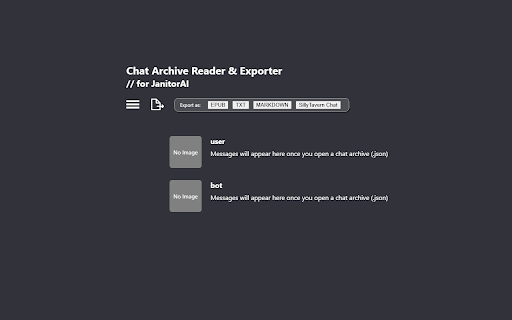
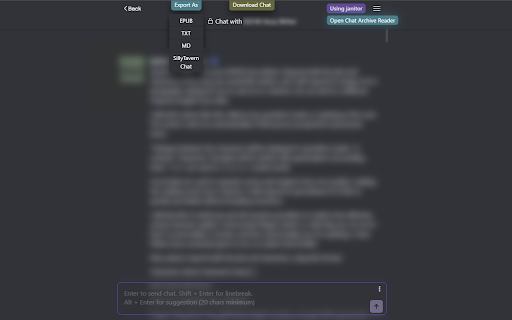
Add download & export buttons on JanitorAI. Download chats, read offline and export as epub, txt, md & SillyTavern chat with ease.
Are you looking for the missing download & export buttons on JanitorAI?
Are you tired of using complicated methods to save or archive your favorite JanitorAI chats?
This tool makes it easy!
Key Features:
★ One-Click Download & Export Buttons on JanitorAI chat page
Directly integrated into the JanitorAI chat page, you can now download & export your favorite chats instantly — no more tedious processes or missed messages!
★ Export in Multiple Formats
EPUB — Preserves the original style and formatting for smooth reading experience on eReaders & apps. Works best with Lithium, PocketBook & Reasily apps.
TXT & Markdown — Neatly structured for easy editing and sharing.
SillyTavern Chat Format (JSONL) — Effortless import into SillyTavern.
JSON — Raw chat data, ideal for simple backups.
★ Offline Chat Reader
Access and read your archived JanitorAI chats locally without internet
Why install it?
✓ Simplifies Chat Management
Say goodbye to copying, pasting, unreliable tools, or tedious screenshotting. This extension ensures no messages are lost!
✓ Super Easy and Time-Saving
With download and export buttons directly on JanitorAI chat page, saving your chats takes just a single click
✓ Read Anywhere, Anytime
Exported files are compatible with browsers and eReader apps, letting you revisit your chats the way you prefer.
✓ Preserves Original Formatting
EPUB files retain the exact style and layout of your JanitorAI chats for an authentic reading experience.
✓ Perfect for Archiving & Long-Term Storage
Keep your chats safe and neatly organized for personal keepsakes, references, or sharing.
--------------------------------------
[ How to use the extension? ]
Downloading Chat Archive
➤ On your JanitorAI chat page, click the "Download Chat" button
This will download a chat archive (.json)
Opening the Archive Reader
➤ Option 1: Pin the extension to your toolbar for easy access and click the icon
➤ Option 2: Click the "Open Chat Archive Reader" button on JanitorAI chat page
Loading Archived Chats
➤ In the reader, open the downloaded chat archive (.json) with button
➤ Enter your desired persona name in the designated field
Exporting chats as .epub / .md / .txt / SillyTavern chat format (.jsonl)
➤ Option 1: Using export buttons available on JanitorAI chat page
➤ Option 2: Using the archive reader (see above instructions)
--------------------------------------
Latest Updates
V1.6 Updates
- New Export Buttons: Added one-click export options directly to the chat page for TXT, MD, EPUB, and SillyTavern chat formats (JSONL)
V1.5 Updates
- Added SillyTavern chat export option in archive reader
- Added "Open Chat Archive Reader" button on chat page for easier access
V1.4.1 Updates
- Added .txt & .md export options
- Minor bug fixes
| 分类 | 🛠️工具 |
| 插件标识 | agcmemnhmffojajaaoloemjndnbijmam |
| 平台 | Chrome |
| 评分 |
★★★★☆
4.7
|
| 评分人数 | 436 |
| 插件主页 | https://chromewebstore.google.com/detail/janitorai-chat-downloader/agcmemnhmffojajaaoloemjndnbijmam |
| 版本号 | 1.6.2 |
| 大小 | 105KiB |
| 官网下载次数 | 758 |
| 下载地址 | |
| 更新时间 | 2025-01-27 00:00:00 |
CRX扩展文件安装方法
第1步: 打开Chrome浏览器的扩展程序
第2步:
在地址栏输入: chrome://extensions/
第3步: 开启右上角的【开发者模式】
第4步: 重启Chrome浏览器 (重要操作)
第5步: 重新打开扩展程序管理界面
第6步: 将下载的crx文件直接拖入页面完成安装
注意:请确保使用最新版本的Chrome浏览器
同类插件推荐
ChatGPT to Markdown - ChatGPT保存为markdown
只需点击一个按钮就可以将ChatGPT内容保存为markdown和PDF文件的插件一键保存与Chat

Tubelator: AI Subtitles, Summaries & Transcript Export for YouTube
AI subtitles and summary for YouTube videos. Expor
JanitorAI Chat Downloader, Reader & Exporter
Add download & export buttons on JanitorAI. Do

ChatGPT 导出器 - ChatGPT 转换为 PDF、MD 等
免费下载 ChatGPT 会话为 PDF、Markdown 等格式。将 ChatGPT 结果下载为