
URL Shortener Chrome 插件, crx 扩展下载
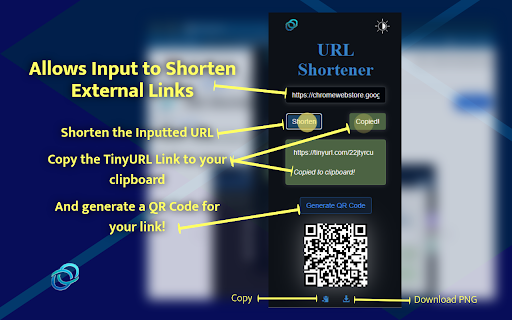
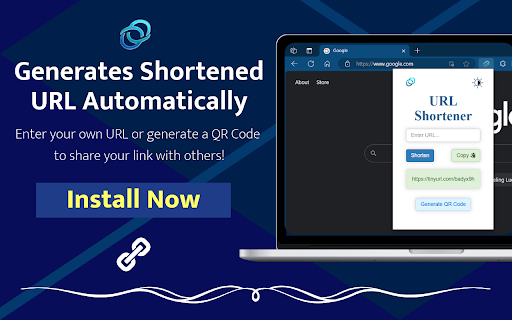

Fastest way to shorten URLs with the TinyURL API. Click the icon to shorten the current URL & generate a QR Code, or input your own.
The fastest and easiest way to shorten URLs using the TinyURL API. Click the icon to shorten the current page URL, generate a QR Code, or input your own URL to shorten.
➡️ Do you want to use this easy-to-use URL Shortener in any Chromium-based browser? Click "Install" to add the extension to your toolbar. This TinyURL-based URL Shortener is the perfect solution to those looking for a simple, easy-to-use web extension.
?Simply click the icon to automatically shorten the URL of your current webpage. This link can also be copied to your clipboard with the click of a button! If you want to shorten a different URL, feel free to input your own link in the text entry box and click submit to generate a new TinyURL link.
? New Feature: Generate QR Codes for any URL with a single click! Quickly create QR codes for easy sharing of URLs. This feature is perfect for sharing links in a more versatile and scannable format. The update also features a "Copy-to-Clipboard" button and a "Download PNG" button to help share your QR Code!
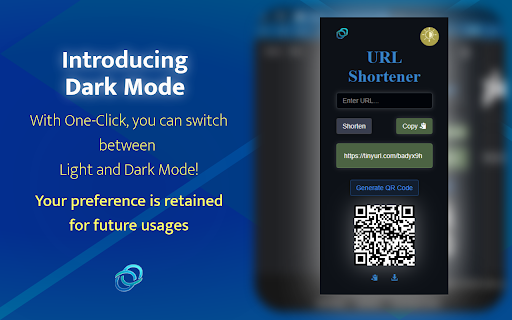
?New Feature: Dark Mode! Enjoy a user-friendly interface with our new dark mode setting. This mode reduces eye strain, especially in low-light environments, providing a comfortable user experience for night-time browsing or for those who prefer a darker aesthetic. The application retains your preference for future usages!
? The extension runs on a very lightweight script saving resources and is not user-intensive for the CPU.
?This extension does not save or maintain any account of links provided to ensure user privacy. Start using this extension today! Thank you for your support!
Latest Release - Version 2.0.0
✨ Features
⨀ Easily shorten any link
⨀ Uses the famous TinyURL API
⨀ Input your own URL to shorten manually
⨀ Copies the shortened URL to your clipboard
⨀ Generate QR Codes for any URL
⨀ Copy or Download QR Codes for ease of sharing
⨀ Dark Mode for reduced eye strain and a sleek look
⨀ Full user privacy
⨀ Intuitive User-Interface
⨀ Only 1 click away from a shortened URL
⌛Upcoming Features
⨀ History management of past links
? Long, annoying links often discourage publicity. Whether sharing links to friends, or promoting your brand/business on social media, email, or even your website, URL Shortener can help increase the likelihood of growing audience!
? Feel free to contact me, Rishit Agrawal, at [email protected] to address any questions or concerns.
| 分类 | 📝工作流程与规划 |
| 插件标识 | aiiihhpcmpabcbcgogcmbbgkjbapkfeb |
| 平台 | Chrome |
| 评分 |
★★★★☆
4.8
|
| 评分人数 | 6 |
| 插件主页 | https://chromewebstore.google.com/detail/url-shortener/aiiihhpcmpabcbcgogcmbbgkjbapkfeb |
| 版本号 | 2.0.0 |
| 大小 | 1.95MiB |
| 官网下载次数 | 224 |
| 下载地址 | |
| 更新时间 | 2024-06-20 00:00:00 |
CRX扩展文件安装方法
第1步: 打开Chrome浏览器的扩展程序
第2步:
在地址栏输入: chrome://extensions/
第3步: 开启右上角的【开发者模式】
第4步: 重启Chrome浏览器 (重要操作)
第5步: 重新打开扩展程序管理界面
第6步: 将下载的crx文件直接拖入页面完成安装
注意:请确保使用最新版本的Chrome浏览器
同类插件推荐

URL Shortener
Fastest way to shorten URLs with the TinyURL API.
URL缩短器 & 自动复制
只需单击一下,即可从当前页面的 URL 生成缩短的 URL。- 只需单击一下即可缩短长 URL。 -

适用于Google Chrome™的网址缩短器
只需单击工具栏上的扩展程序图标,即可使用TinyURL.com URL缩短服务来缩短当前页面的URL

Url Shortener
Quickly create and share short URLs with the added