
Hiya Deepfake Voice Detector Chrome 插件, crx 扩展下载
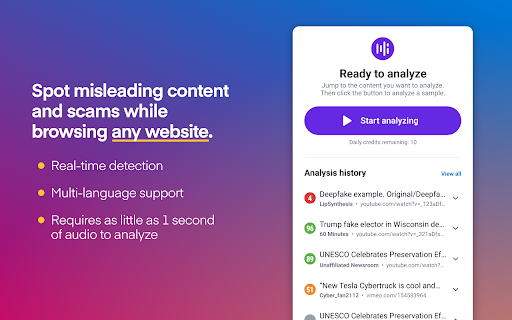
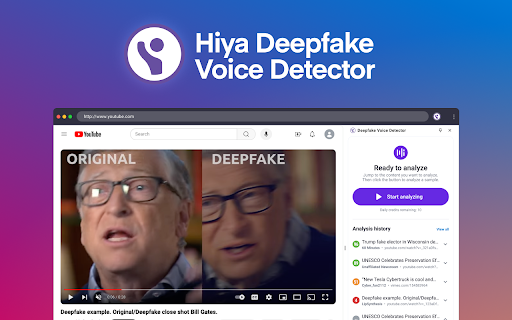
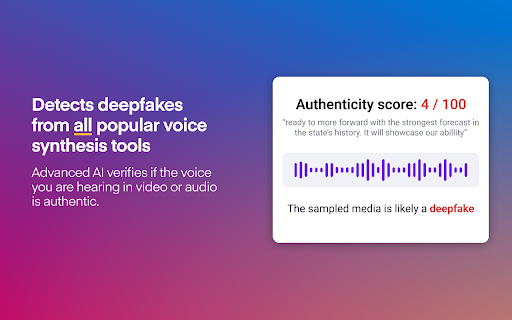
Detect if a voice in a video or audio played in a Chrome tab is real or AI-generated.
The Deepfake Voice Detector uses advanced AI to verify if the voice you are hearing in video or audio is authentic.
Trust what you hear with Hiya.
Voice cloning tech is easy to get and as a result, deepfake scams are increasing at an alarming rate. 1 in 4 people have already been hit by a voice deepfake scam (Hiya survey). That’s why Hiya is stepping in with some good AI to fight the bad.
Our free Deepfake Voice Detector helps you spot misleading content and scams while browsing online.
Why Install Hiya’s Deepfake Voice Detector?
Powered by advanced AI Voice technology, Hiya makes deepfake detection accessible to everyone. Whether on social media or news sites, this cutting-edge tool helps users verify if the voice they hear in video or audio is authentic or AI-generated.
Key Features
- Free
- Real-time detection
- Multi-language
- Works on any website
- Detects voices created by all popular voice synthesis tools
- Requires only 1 second of audio to perform a verification
For more information on Hiya’s AI Voice detection capabilities, please visit https://www.hiya.com/products/ai-voice
Disclaimer: Please note that this extension utilizes probabilistic algorithms, which means that its predictions or outputs are based on statistical analysis and may not always be 100% accurate. While we strive to provide the best possible results, we cannot guarantee complete accuracy. Use the extension with this understanding, and always verify important information independently.
| 分类 | 🔒隐私 |
| 插件标识 | akmieeldmgcllmokbpaibfelofjiilpc |
| 平台 | Chrome |
| 评分 |
☆☆☆☆☆
0
|
| 评分人数 | 398 |
| 插件主页 | https://chromewebstore.google.com/detail/hiya-deepfake-voice-detec/akmieeldmgcllmokbpaibfelofjiilpc |
| 版本号 | 116 |
| 大小 | 150KiB |
| 官网下载次数 | 1000 |
| 下载地址 | |
| 更新时间 | 2024-11-24 00:00:00 |
CRX扩展文件安装方法
第1步: 打开Chrome浏览器的扩展程序
第2步:
在地址栏输入: chrome://extensions/
第3步: 开启右上角的【开发者模式】
第4步: 重启Chrome浏览器 (重要操作)
第5步: 重新打开扩展程序管理界面
第6步: 将下载的crx文件直接拖入页面完成安装
注意:请确保使用最新版本的Chrome浏览器
同类插件推荐

MediaVault
A plugin for authenticated users to send links to

Verifiction: Deepfake Detection, Protection and Authorization
Verifiction: Deepfake Detection, Protection, and A

Deep Fake Detector
Detects deep fake video and audio content in the a

AI Voice Detector
Detect if an audio was generated by an AI voice or

Deepfake Detector
Detect if an audio or video is a deepfake or realD

Hiya Deepfake Voice Detector
Detect if a voice in a video or audio played in a

AIPal: When Webpage Meet AI
Chat, write, reply, translate, and more on any web
AI Detector - BitMind
? Identify Fake AI Media with Ease!Say goodbye to

Street View Tracker
Unlock the potential of Open Source Intelligence (

Bellingcat Filename Finder
Display filenames for images uploaded to Google Ma

Hive AI Detector
Check if text, images, audio or videos are AI gene

Archive Page
Archive webpage with archive.todayAdds a button to

RevEye Reverse Image Search
Perform a search by image. Choose between the imag